Session Hijacking: How It Works and How to Stop It
Session hijacking is an attack in which an adversary takes over a user's authenticated session by stealing the token that proves the user logged in.
The token works as a bearer credential, so whoever holds it gains the same access as the legitimate user. These tokens include browser cookies, OAuth tokens, cloud session credentials, and Kubernetes service account tokens.
%201.svg)


- Session hijacking works because a token is a bearer credential. Whoever holds it is treated as the user. Possession is identity.
- That's why MFA, HTTPS, and password resets don't stop it. They guard the login. The token is stolen after the login succeeded.
- Attackers use infostealer malware and adversary-in-the-middle proxies, then chain one stolen session into cloud accounts and Kubernetes clusters.
- A stolen token looks valid, so the only place to catch it is at runtime, by watching how it behaves once used.
- The real fix is device binding, but it isn't universal yet.

Why a stolen token is as good as your password
A stolen token is as good as your password — often better — because it skips authentication entirely. Whoever holds it is already logged in. No password to enter. No second factor to satisfy.
Most session security advice treats the password as the asset to protect.
Lock down the password. Turn on MFA. That's where most security guidance stops. But attackers stopped going after passwords a while ago. They go after what the password gets you: the session.
Here's what happens when you log in.
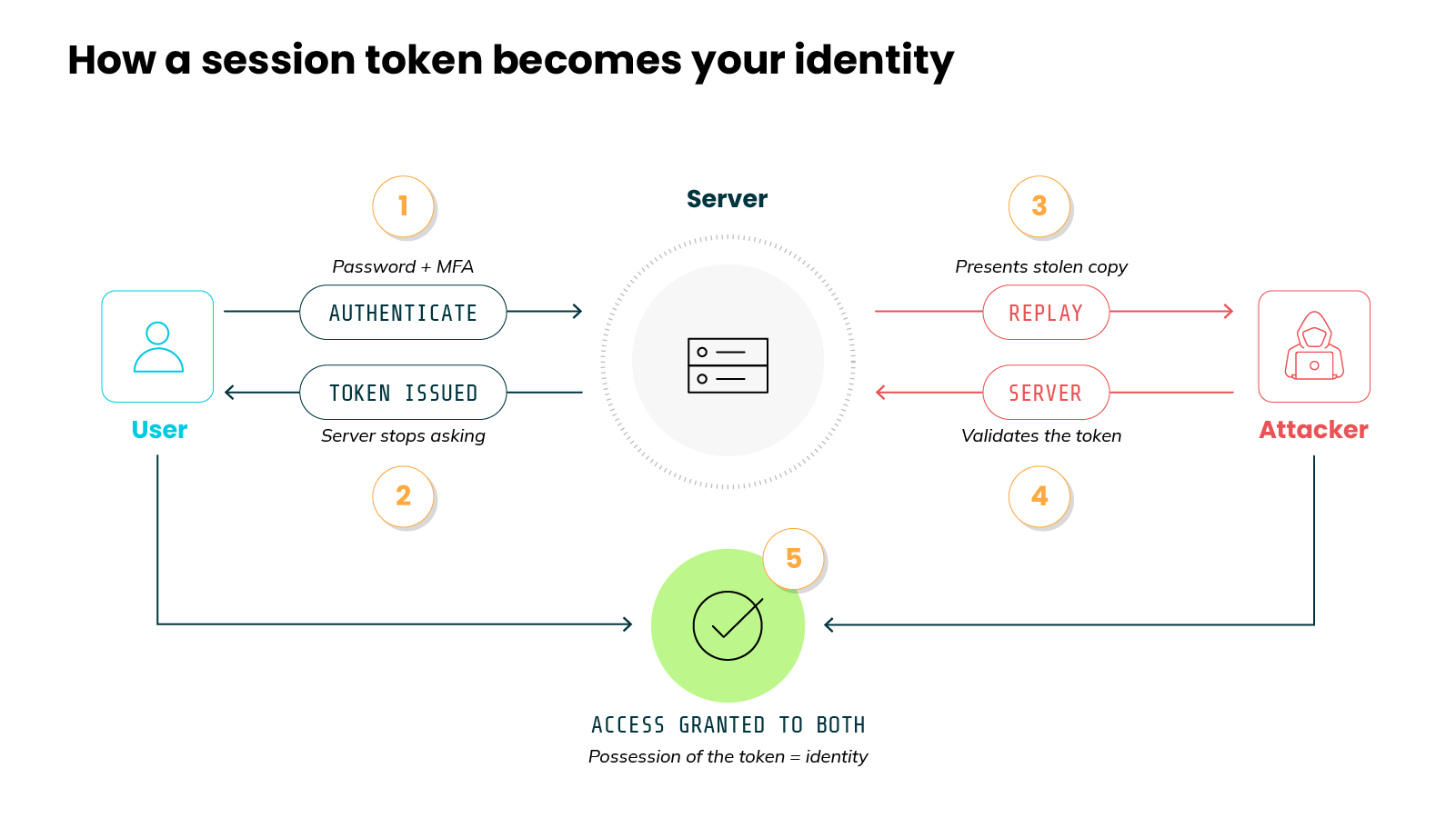
The password proves who you are one time. → The server then issues a token. → That token stands in for your identity for the rest of the session. → From that point on, the system trusts the token...not you directly.
This is the root of session hijacking.
An attacker who steals the token skips the password. They skip the second factor too. The system sees a valid token and grants access.
Why does that work?
Because a session token is a bearer credential. And a bearer credential grants access to whoever presents it. There's no further check on identity.
Important: this isn't a flaw. It's the design.
The point of a token is to let the server stop asking who you are. Re-authenticating on every request would be slow. The token removes that friction. The same convenience is what makes it worth stealing. Possession of the token becomes identity.
Now let's widen the definition.
A session is not only a browser cookie. Basically, the cookie is one case. Not the whole category. Anything that functions as a bearer credential is a session token:
- OAuth access and refresh tokens for SaaS applications
- Cloud console and IAM session credentials
- Kubernetes service account tokens
- Workload identity tokens issued to running services
- Pipeline tokens used by build and deployment systems
Every item on that list proves authentication. None of them gets a second challenge. Steal one and you inherit the access tied to it.
This is also why password hygiene doesn't help at all here. A strong password protects the login, but does nothing for a token that has already been issued. A password can be reset. A token often stays valid until it expires on its own clock.
How a session hijack actually unfolds
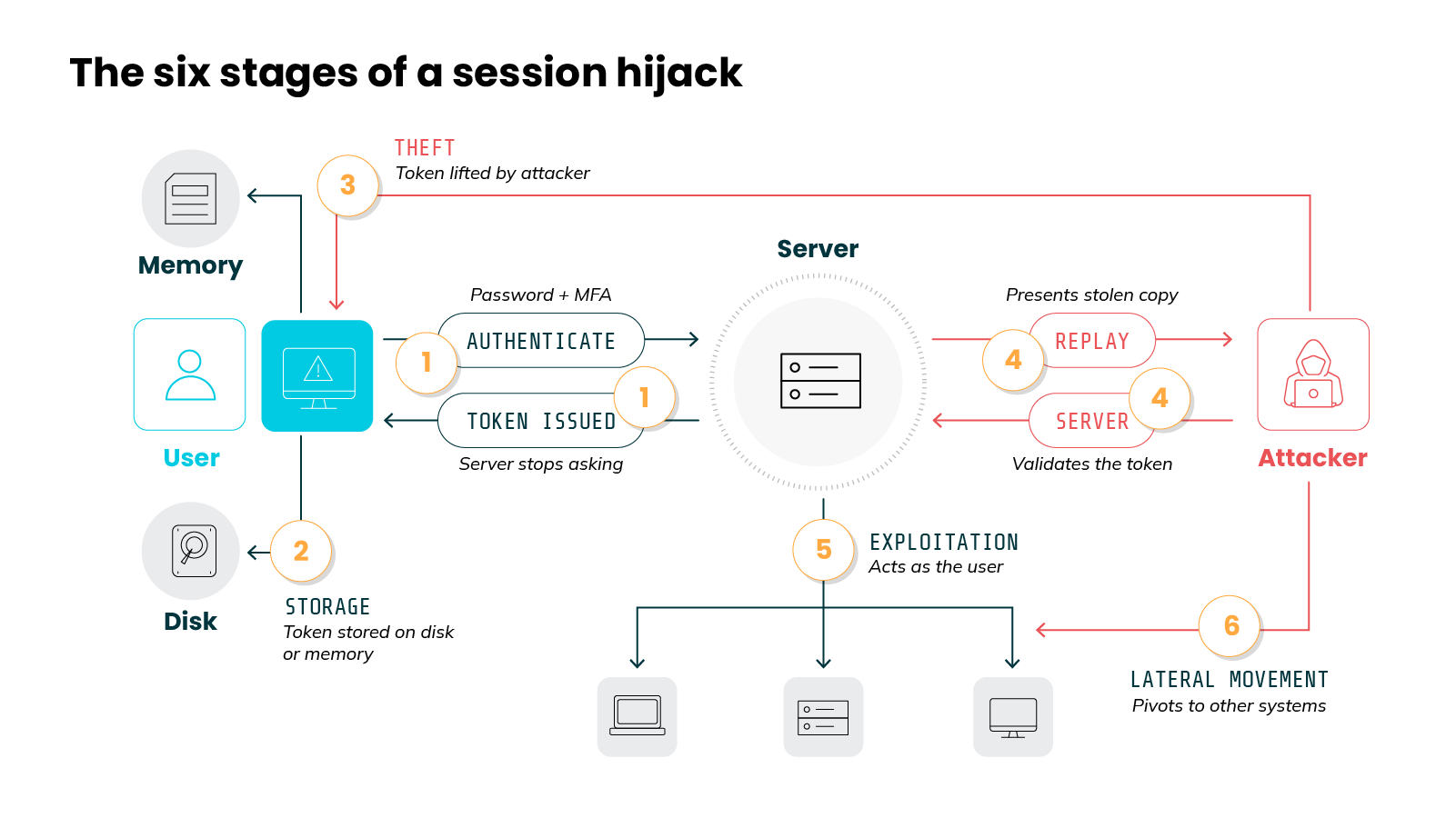
A session hijack unfolds in six stages. Each one flows from the last. The token a server hands out at login becomes, step by step, the attacker's way deep into your environment.
Let's dig into the full sequence.
For example:
Picture a single browser cookie. Issued at login, stored on disk. Then malware lifts it, and the attacker replays it from their own machine. They read a mailbox. Then trade that access up for a connected app. Six stages. One cookie.
Keep this sequence in mind. Every technique in the rest of the article maps back to one of these stages.
How do attackers steal session tokens?
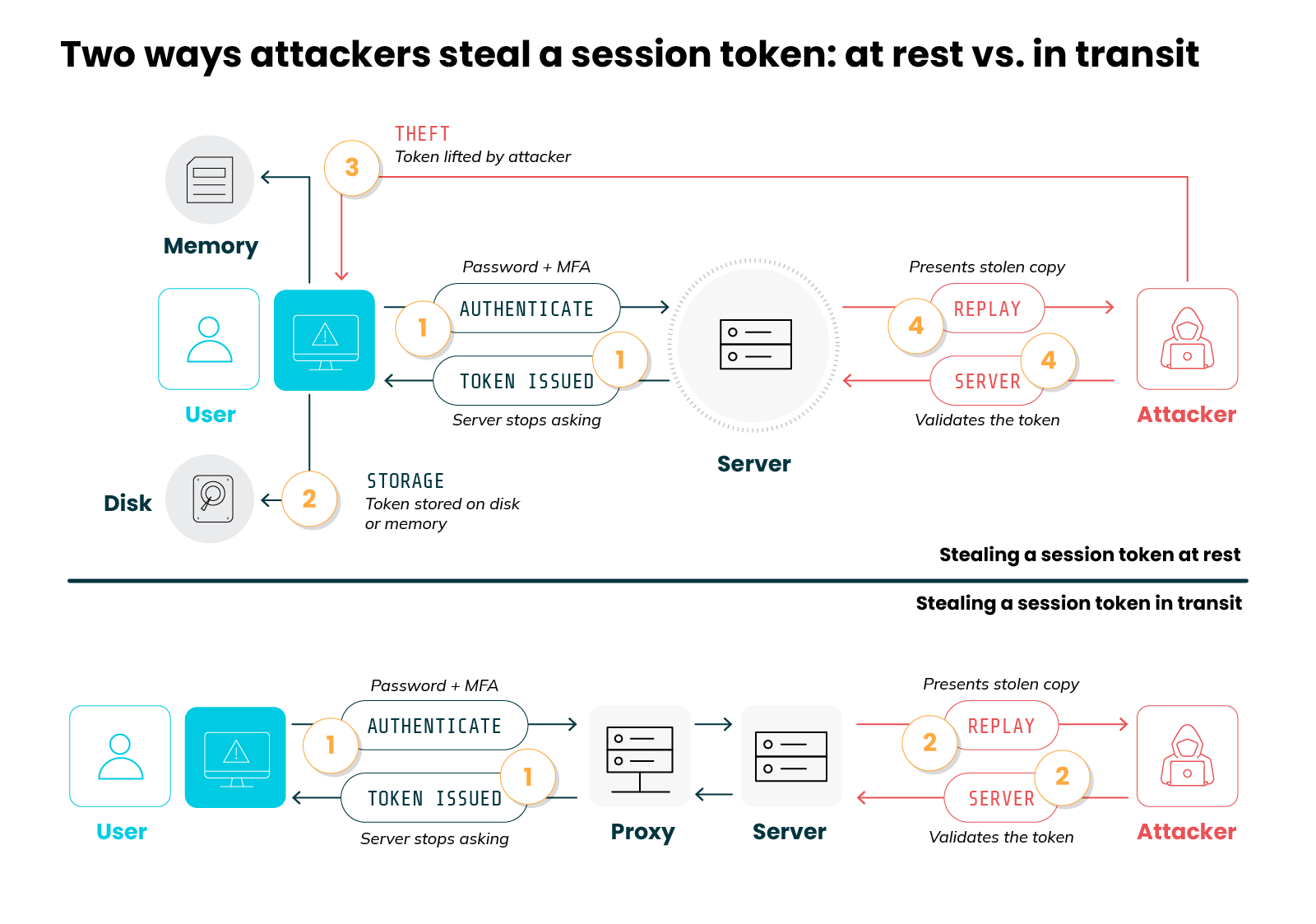
Attackers steal session tokens mainly by infecting the user's device with infostealer malware or intercepting the login through an adversary-in-the-middle proxy.
Theft is the stage in the lifecycle where the attack becomes real. Everything before it is setup. This is where the token changes hands.
It helps to know which techniques actually matter now. Most lists you'll find lead with attacks from a decade ago, but the real picture looks different.
Two approaches dominate today. A few older ones still work, but far less often.
Let's break down each.
Infostealer malware
The most common approach starts on the user's own device.
The entry: Malware lands on the endpoint and goes straight for the browser. Some families pull saved passwords and other browser data in the same pass.
The theft: A browser keeps session cookies on disk and in active memory. The malware reaches into both, copies the cookies, and sends them to the attacker. Known families have names. LummaC2. RedLine. Vidar. Raccoon. Many are rented or sold through malware-as-a-service, so an attacker does not have to build one.
Why it works: The attacker never touches the login page. They take the token after it was issued, load it into their own browser, and continue the session from there.
Adversary-in-the-middle (AitM)
The second approach intercepts the login as it happens.
The setup: The attacker places a proxy between the user and the real site. The user thinks they are signing in normally. They enter their password. They complete the multi-factor prompt. Every step passes through the attacker's proxy to the legitimate service.
The theft: The proxy captures the session token the service issues at the end. Multi-factor authentication runs to completion. The attacker simply takes the result. No password is cracked. The second factor is satisfied. The token is still stolen.
In the wild: This fits how some of the most active intrusion groups operate. They use social engineering to get a target onto a malicious page. Help desk impersonation. Convincing phishing. Once the target authenticates, the session is captured and the group moves in through valid access. Cloud and SaaS environments are a frequent target.
The older techniques still exist
The classic attacks haven't disappeared. They're just less central than they used to be.
A short list covers them:
- Cross-site scripting (XSS) runs malicious script in the victim's browser to read the session cookie.
- Session fixation plants a known session identifier on the victim before they log in.
- Network interception captures the token in transit when traffic is not properly encrypted.
These still crop up, but each depends on a narrower condition: a vulnerable application, a misconfiguration, or an unencrypted connection. The two modern approaches need none of that. They go after the token where it rests, or the moment it's created.
That shift is the point.
Token theft moved from exploiting applications to compromising endpoints and identities. Defenses built only for the older attacks miss most of what happens now.
What can an attacker do with a stolen session?
With a stolen session, an attacker can do anything the real user can — read data, move money, change settings, reach connected systems — and from there, escalate toward source code, cloud accounts, or an entire Kubernetes cluster. How far it goes depends on which session was taken.
One stolen token rarely stays one token. The attacker uses the access it grants to reach further. Each new system can hand over another credential. A small foothold becomes a wide one. This is often called token chaining.
Why does it work?
Because the systems an attacker reaches next also trust bearer credentials. The same property that made the first token useful makes the next one useful too. Access compounds.
Let's consider how that plays out across different sessions.
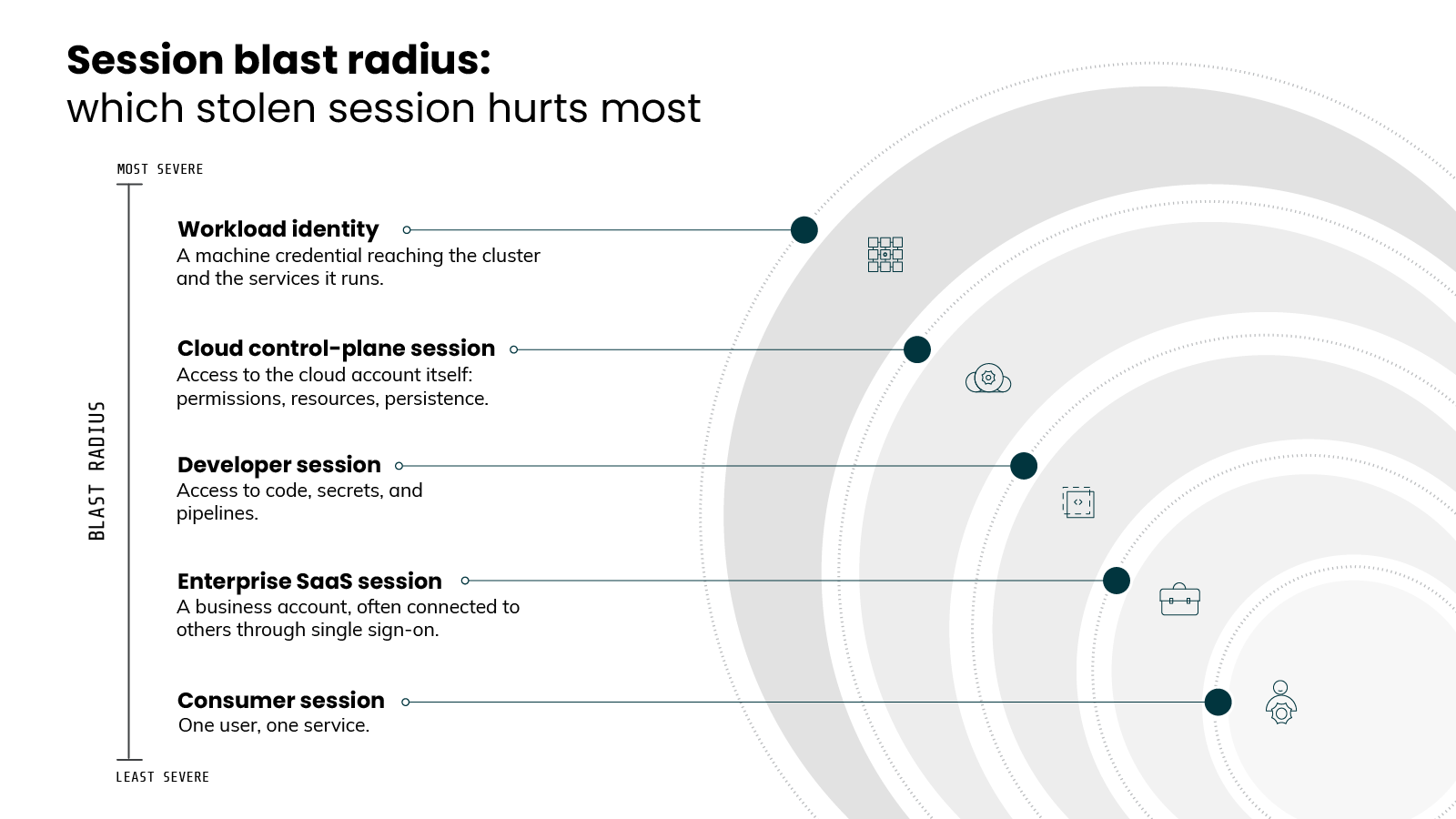
Start with a stolen SaaS session.
Many business accounts connect to other apps through single sign-on. One session can open a chain of connected services. The attacker moves between them without logging in again.
Developer sessions raise the stakes.
They reach source repositories and build pipelines. An attacker with that access can read secrets or alter what gets shipped.
Then there are workload identities.
A service account token taken from a running pod can call the Kubernetes API. Depending on its permissions, that can expose other workloads or the cluster itself.
This is also how some of the most active intrusion groups operate. They often enter through a SaaS session won by social engineering. Then they pivot through connected applications to reach data and identity systems. The initial session is just the door.
Not every stolen session is equal
The damage depends on which session was taken. That is the part most coverage misses.
It helps to think in tiers, from least to most severe:
- Consumer session. A personal account login. Contained to one user and one service.
- Enterprise SaaS session. A business account. Often connected to others through single sign-on.
- Developer session. Access to code, secrets, and pipelines. A path into what the organization builds.
- Cloud control-plane session. Access to the cloud account itself. Permissions, resources, and persistence.
- Workload identity. A machine credential inside the environment. A path to the cluster and the services it runs.
The higher the tier, the wider the blast radius.
So this is where prioritization comes in.
It tells you where to focus. Not every session needs the same scrutiny. The ones with control-plane or workload access carry the most risk. So they deserve the most monitoring and the fastest response.
That sets up the harder question. If nothing about the request looks wrong, how do you catch any of this while it happens?
Why MFA, HTTPS, and password resets don't stop session hijacking
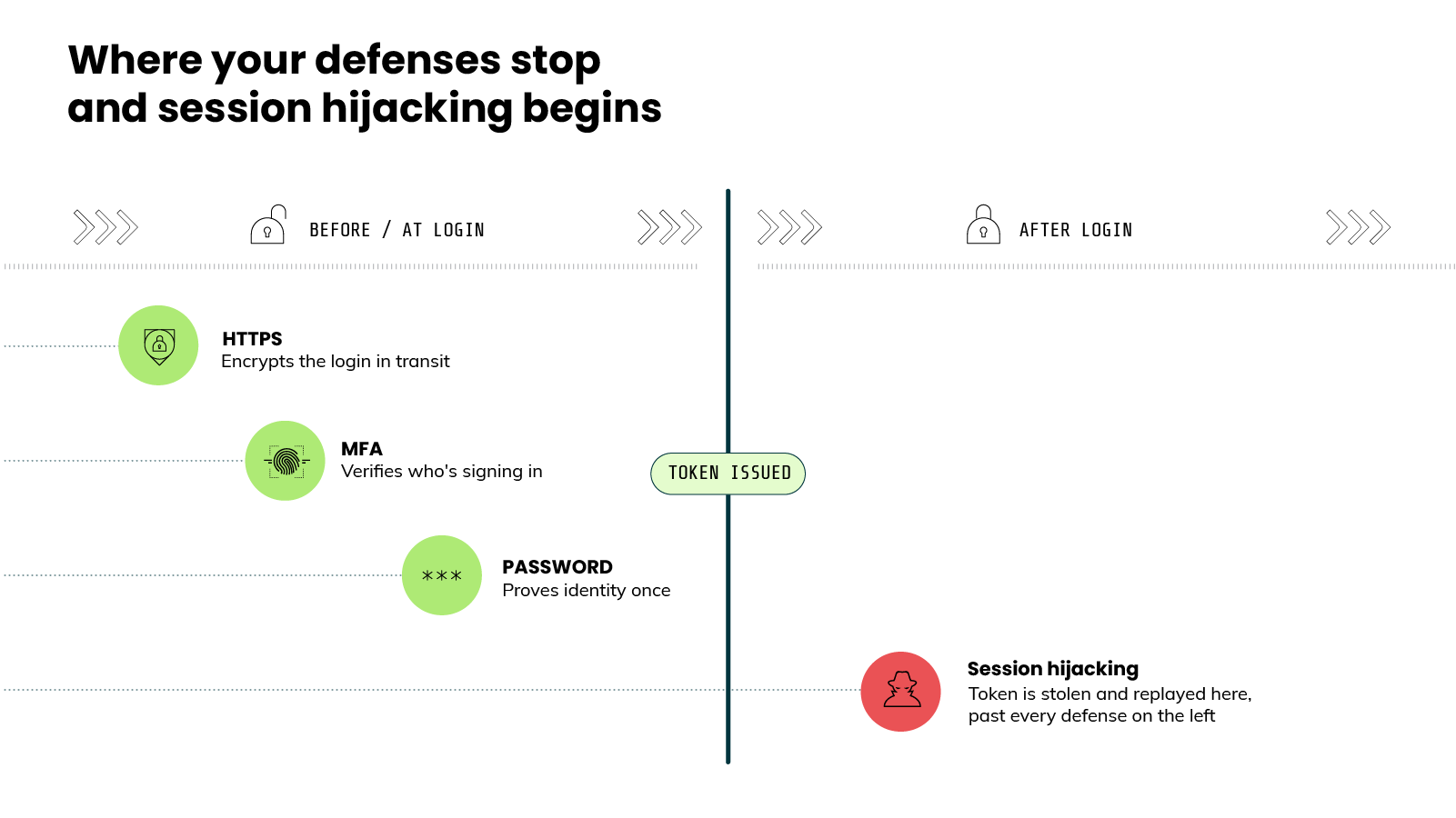
Ask most teams how they defend against account takeover and you'll hear the same three answers: Turn on MFA. Enforce HTTPS. Reset the password if something looks wrong.
All three are good practices. None of them stops session hijacking.
Each one protects the login. Session hijacking happens after the login is already done. These defenses guard the entrance. The stolen token is already inside.
In other words:
These are credential-layer defenses. This is a bearer-credential problem. They act at different moments.
Take MFA first.
MFA guards the sign-in. The problem is that an adversary-in-the-middle attack lets the sign-in succeed. We covered the mechanism earlier…the point here is the timing. Every prompt gets satisfied, the service issues a real token, and the theft happens after the gate has already closed behind the user. MFA ran to completion. The session was still taken.
HTTPS has a different gap.
It encrypts traffic in transit, which stops an attacker from reading the token off the wire. It does nothing once the token sits on the endpoint. Infostealer malware reads the cookie straight from the browser, on a connection that was encrypted the entire time. Encryption was never the weak point.
Password resets are the most misunderstood of the three.
A reset changes the password. The stolen token does not depend on the password. On many platforms the existing session stays valid on its own clock. It lives until it expires or until someone explicitly revokes it. An attacker can keep working long after the user believes the breach is closed.
Why do all three miss?
Because they were built around a different assumption. They treat the login as the thing to defend. Session hijacking ignores the login entirely. It goes after what the login produced. These defenses can't see that object, so they can't protect it.
It's worth noting, this definitely isn't an argument against using them. Use all three. They close other doors.
Just know that they leave this one open. Which raises the question the rest of the defense depends on. So the question isn't how to guard the login. It's how to catch the token once it's already being used.
How do you detect a session hijack in real time?
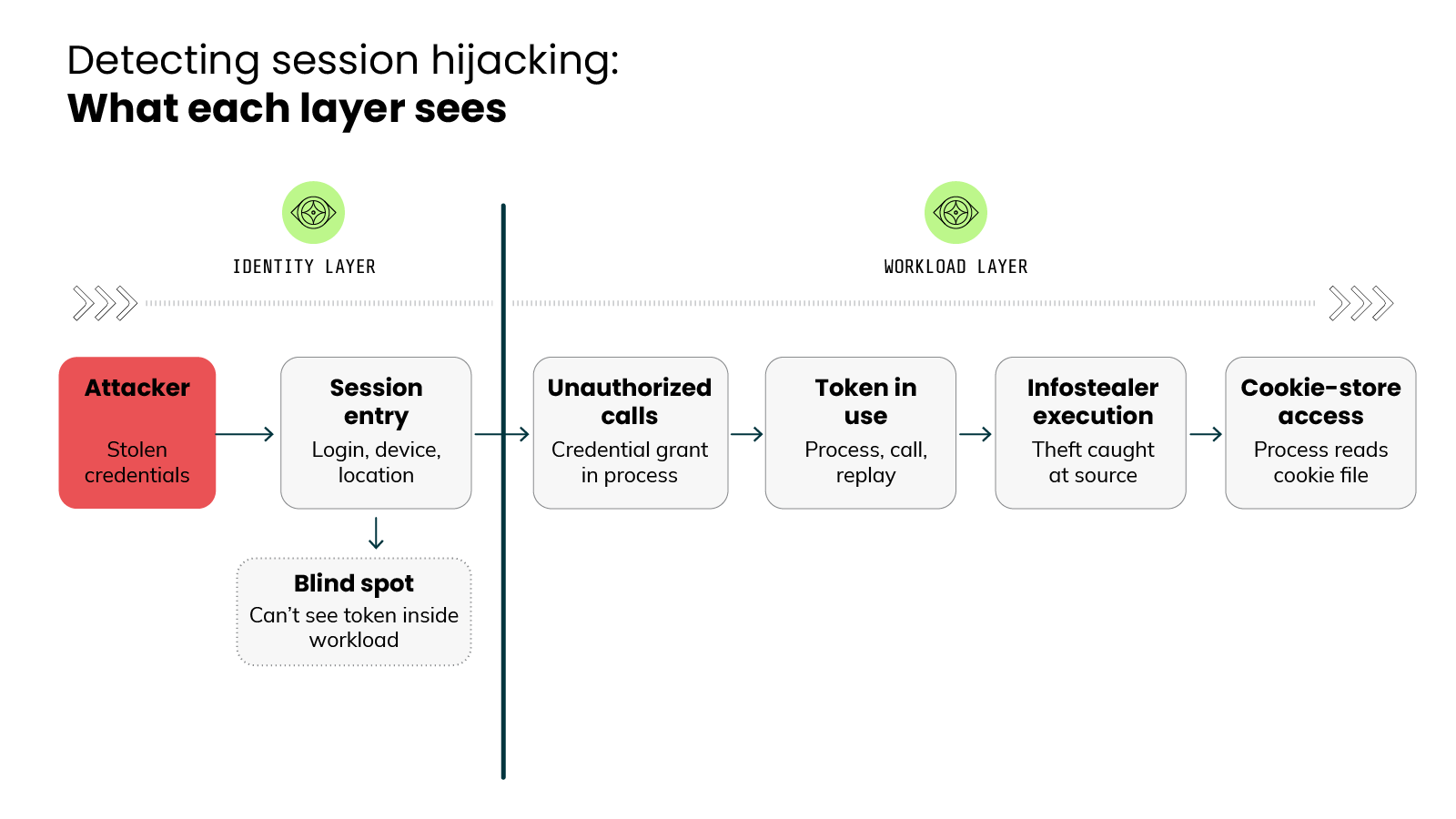
You detect a session hijack by watching behavior, not the token. The token looks valid wherever it is. What gives an attacker away is what they do with it: reading a cookie file, calling a metadata service, replaying the token against the Kubernetes API from somewhere it has no reason to be.
So you stop watching the token. You start watching behavior. It's valid in the attacker's hands and valid in the user's, so the credential itself tells you nothing. What matters is what happens around it. Who's using it, from where, to do what.
That behavior shows up at two layers:
Most detection advice stops at the first layer.
Those identity signals are useful. Like a login from an impossible location, a session on a new device, one account active in two places, etc. They catch some hijacks.
But they have a ceiling.
Identity signals watch the front of the session, not what the token does once it's inside your environment. An infostealer reading a cookie file leaves no failed login. A stolen service account token calling the cluster sets off no impossible-travel alert. Once the token is in, the identity layer is blind.
That's where the workload comes in.
Because that's where the token is actually used. A bearer credential is invisible on the wire. The only place to catch its misuse is the moment it acts: at the host, the container, the Kubernetes layer, the cloud services underneath.
This is where runtime detection lives. It surfaces signals nothing upstream can, including:
- Cookie-store access. A process reading the browser's cookie files is a strong theft signal. Legitimate software rarely touches them, so that access can be flagged the moment it happens.
- Infostealer execution. The malware that steals tokens runs on the endpoint, and its behavior is observable. You catch the theft at its source, before the token ever leaves.
- Unauthorized metadata calls. A workload reaching the cloud metadata service for credentials it shouldn't request is token theft in progress, and that call is visible at runtime.
- Stolen-token replay. A token used against the Kubernetes API or a cloud endpoint from an unexpected process or location stands out. The replay is where a hijack becomes action. It's also where it gets caught.
Built in the open, this detection logic stays adaptable. Rules can be read, tuned, and extended to fit your environment. You're not stuck with one vendor's fixed assumptions about what looks suspicious.
But that does leave the issue of volume:
The problem: Runtime produces more alerts than a team can triage in time. A real replay sits in a queue while someone works through noise.
What fixes it: Automation connects the dots. It links a metadata call to the process that made it, then to the replay that followed. That chain gets separated from normal activity and surfaced first. Detection and triage both happen in real time, with a human in the loop on what matters.
It all comes together against a real attack.
An attacker enters through a stolen SaaS session, then pivots toward connected systems and the cloud. The identity layer might miss the entry. The workload layer catches what comes next: first the unexpected process, then the metadata call, then the replay against the control plane. That's the moment to catch it, and it only exists at runtime.
Detection catches the attack in motion. It doesn't change what makes the attack possible in the first place. For that, the token has to stop being something anyone can use.
Session hijacking mapped to MITRE ATT&CK
Session hijacking maps to six MITRE ATT&CK techniques across two tactics covering the theft of the token (T1539, T1528, T1606), its replay (T1550.004), and the cloud and container credential access it leads to (T1552.005, T1552.007).
The mapping does real work.
ATT&CK assigns a stable ID to each adversary technique. Those IDs let a SOC tie this attack to detection rules, threat intelligence, and reporting. A page that explains session hijacking but skips the mapping is readable. It is not operational.
So here is session hijacking expressed in ATT&CK terms.
The attack does not map to a single technique. It spans several, across different tactics, which is part of why it is hard to catch. Theft, replay, and cloud credential access each carry their own ID.
FYI: T1550.004 sits under Lateral Movement, not Credential Access. That placement is the whole problem in one data point. Stealing the cookie is one tactic. Using it is a different one. The defenses built for the first do not cover the second.
How to respond when a session is already compromised
You've confirmed a hijack. A token is in the wrong hands. What now?
The instinct is to reset the password. We covered why that doesn't work. So response has to start somewhere else.
Let's walk through the sequence that actually contains it.
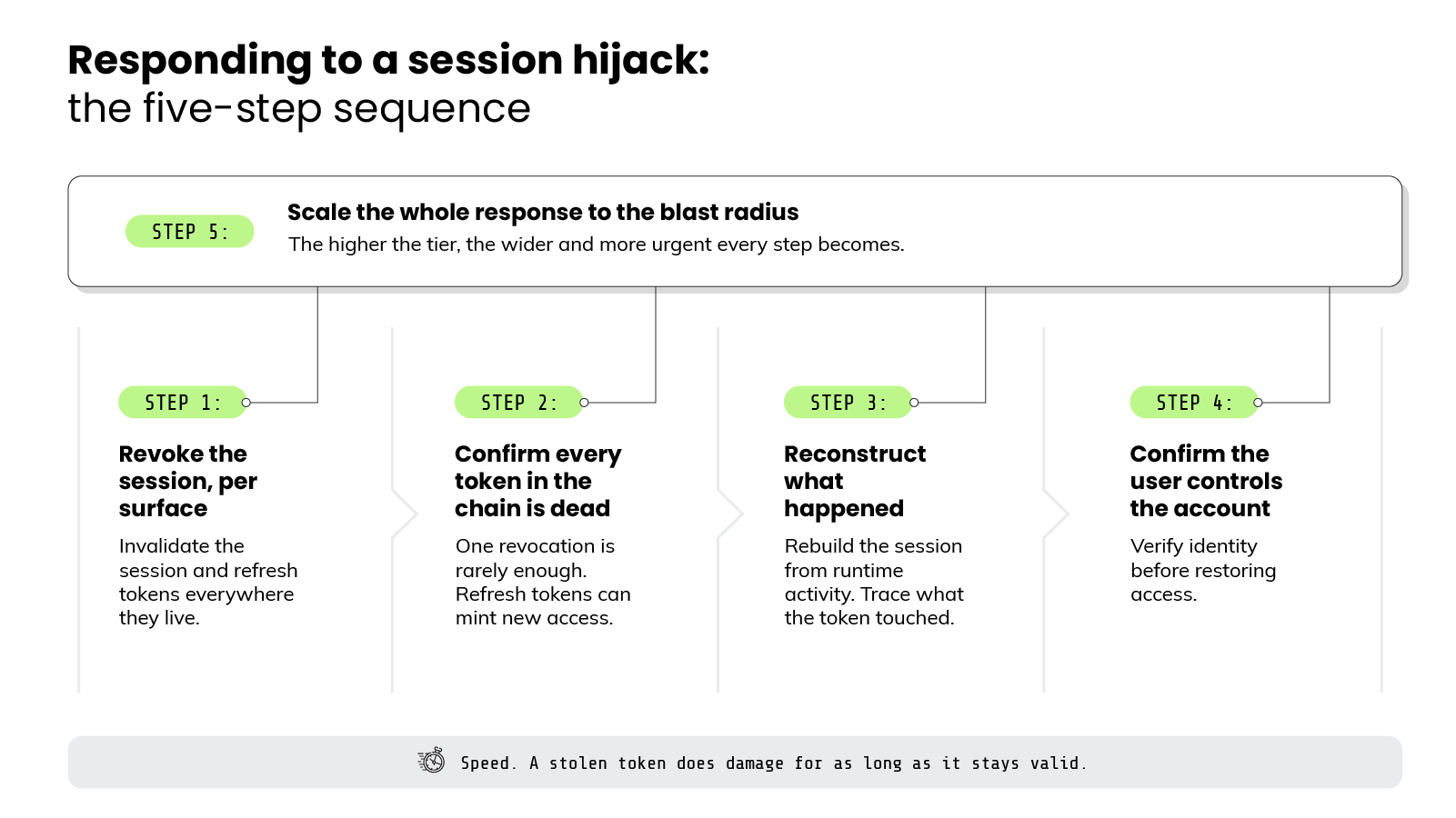
Step 1: Revoke the session, per surface
You don't reset. You revoke. Killing the session itself is the first real move.
And revocation happens per surface. Each place a token lives has its own way to invalidate it.
- SaaS and identity providers. Revoke the active session and its refresh tokens. A password change alone may leave both alive.
- Cloud sessions. Invalidate the session credentials. Rotate the underlying keys or roles they came from.
- Kubernetes. Revoke or rotate the service account token. Remove the access the compromised pod was granted.
Pro tip: Revoke at the identity provider, not just the app. Kill only the app token and the IdP can mint a fresh one. Cut the session at its source and every downstream token dies with it.
Step 2: Confirm every token in the chain is dead
Revocation isn't always instant. This is where response often falls short.
Some tokens stay valid until they expire on their own clock. Refresh tokens can mint new access even after the original session looks closed. So one revocation is rarely enough.
The job is not "revoke the session." It's making sure every token the attacker could still hold is actually dead.
Step 3: Reconstruct what happened
Now answer the question leadership will ask. What did they do while they were in?
This is where forensic replay matters. Rebuild the session from runtime activity. Trace what the token touched, what it accessed, and where it moved.
A clear timeline turns "we think we contained it" into "here is exactly what happened."
Pro tip: Capture evidence before you tear things down. Revoking tokens and killing pods can wipe the activity you need to reconstruct the attack. Snapshot first, then contain.
Step 4: Confirm the user controls the account
A revoked session sends the legitimate user back to re-authenticate. Make sure it's actually them.
Many hijacks begin with social engineering aimed at account recovery and help desks. So reissuing access without verifying identity can hand the account straight back to the attacker.
Confirm control first. Then restore access.
Pro tip: A contained session isn't a contained attacker. Check for what they added while inside: a new API key, an OAuth app, a forwarding rule, an IAM role. Those survive revocation and hand them a way back.
Step 5: Scale the whole response to the blast radius
This step is not last because you do it last. It's the lens you apply to the other four.
Once you know which session was taken, you know which tier you're in. Remember the blast-radius tiers from earlier. A stolen consumer session is contained. A stolen control-plane or workload session isn't.
That tier sets the intensity of everything above. The higher the blast radius, the wider and more urgent every step becomes.
One standard ties the whole sequence together. Speed.
A stolen token does damage for as long as it stays valid. Every minute of delay is access the attacker keeps. Detection only helps if revocation and containment keep pace with it. That is the standard worth holding response to.
Every step here is cleanup after the fact. The only way out is a token that's worthless the moment it's stolen.
The real fix to session hijacking: making tokens non-bearer
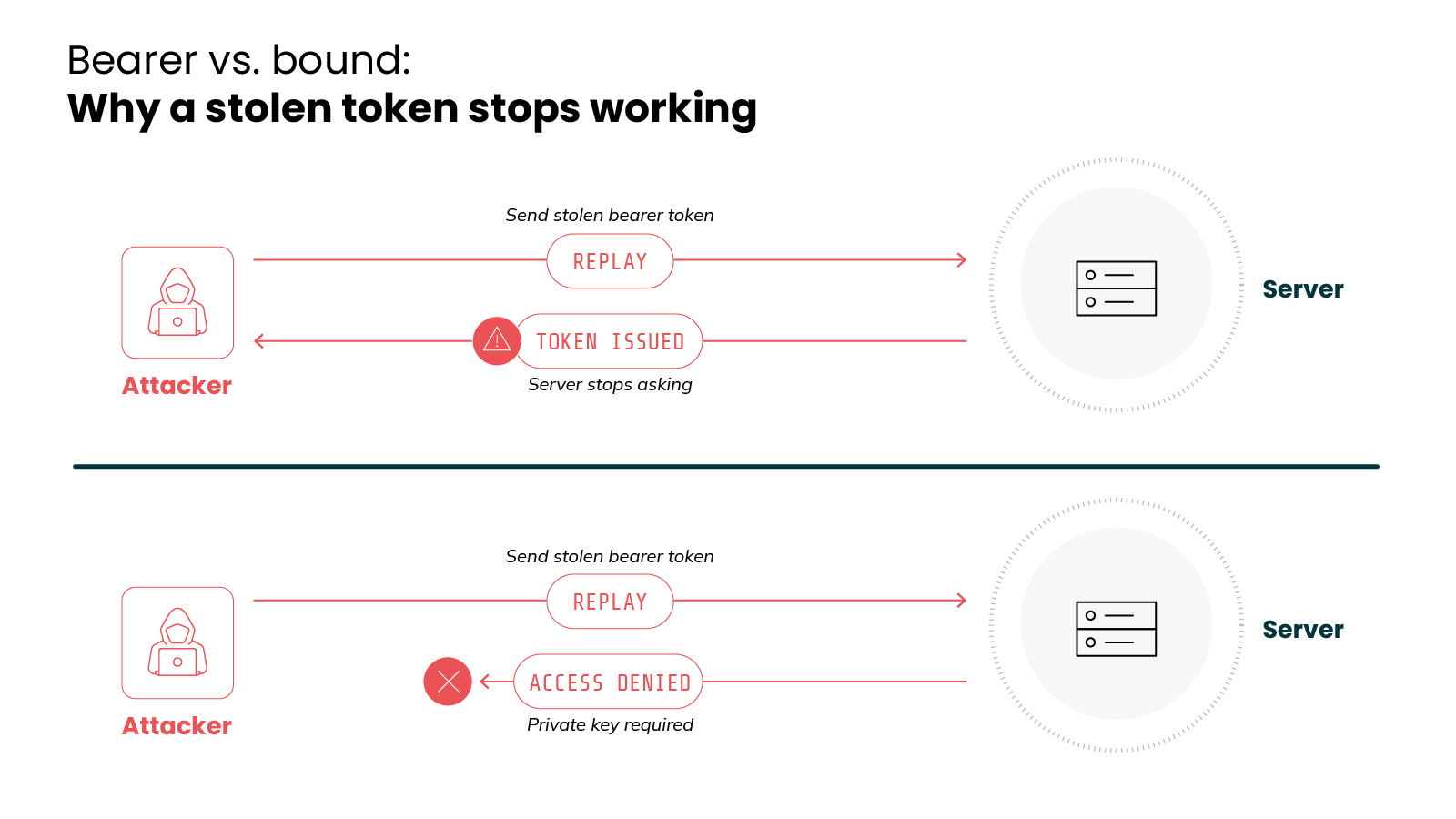
The real fix to session hijacking is making tokens non-bearer because the attack depends entirely on possession equaling identity, and binding a token to a specific device breaks that link, leaving a stolen token useless to anyone but its owner.
Everything so far has been a way to cope with a stealable token. Detect the misuse. Revoke fast. Reconstruct the damage. All necessary. But none of it changes the underlying problem: the token can be stolen and used by anyone who holds it.
That's because the token is still a bearer credential. Whoever holds it is treated as the owner.
The fix is to change that. Make the token stop working for anyone but the real user. That's device binding.
Here's the idea.
A bearer token proves nothing about who presents it. A bound token is tied to a specific device through cryptography.
The device holds a private key. The token only works when paired with proof of that key. Steal the token alone and you get nothing. You don't have the key.
In other words:
Possession of the token stops being identity. That's the whole property attackers have been exploiting. Device binding removes it at the source.
Several approaches put this into practice, each at a different layer:
- Passkeys replace the password with a key pair bound to the device. There's no shared secret to phish. Sign-in proves possession of the private key directly.
- DPoP binds an access token to a key the client holds. Present the token without proof of the matching key and it's rejected. That closes the OAuth-token theft path.
- DBSC (Device Bound Session Credentials) brings the same idea to browser sessions. The cookie is tied to a key on the device, so a stolen cookie alone no longer replays.
- Mutual TLS binds the connection itself. Both sides authenticate with certificates, so a token lifted from that channel can't be reused outside it.
The honest part: none of this is finished. DBSC is early, reaching public availability on Windows only recently…other platforms still to follow. Passkeys adoption is growing but uneven. DPoP and mTLS need support on both ends.
Which means device binding is the direction, not a switch you flip today.
Until binding is everywhere, most tokens in your environment are still bearer credentials. They can still be stolen. They can still be replayed. The structural fix is coming, but it isn't here yet. So there's a job to do in the meantime.
Think back to the attack we followed earlier.
A session taken through social engineering, replayed from somewhere new, pivoted toward connected systems and the cloud. Device binding would have broken it at the first step. The stolen session would never have replayed.
Until that protection is universal, the next best place to catch the attack is the moment the token moves. Watch where credentials are used, not just where they're issued. That's session hijacking handled the right way. Detected in real time. Contained before it spreads.