Why Shift Left Isn't Enough in Cloud Environments
Shift left isn't enough in cloud environments because it secures code before deployment, and risk keeps changing afterward.
Workloads are ephemeral, permissions drift, and new flaws surface in running code. Shift left can't see any of this, so it can't separate real risk from noise or catch a live attack. Runtime completes shift left by watching what actually runs.
%201.svg)


- Shift left is necessary, not sufficient. It catches known flaws early and cheaply. But it stops watching at deployment, and the cloud keeps changing after that.
- The pipeline's view goes stale the moment you deploy. Workloads are ephemeral, permissions drift, and fresh flaws land on code that's already running.
- Shift left has two blind spots. It can't tell which findings are real. And it can't see a live attack in progress.
- Runtime security covers both. It watches what actually runs, ranks real risk, and catches attacks as they happen. It completes shift left. It doesn't replace it.
- AI widens the gap. It ships more code, and more of it is flawed, faster than any pre-deploy check can keep up. That makes watching production essential, not optional.

What does shift left security get right?
Shift left security gets one big thing right. It catches problems early, when they're cheapest to fix.
The idea is simple. Move security checks earlier in development. Scan the code, its dependencies, and its configurations before they ship. Fix what you find while it's still just a code change.
Here's why that matters:
A flaw caught in development is a quick edit. The same flaw caught in production is an incident. One costs a developer a few minutes. The other pulls in on-call engineers and a full response. Sometimes it reaches customers.
The cost gap is real. Breach-cost research shows that security-mature teams, the ones who build security in early, consistently see lower breach costs. Faster detection and containment lower the cost further. That early view is the whole point of shift left.
Then there's scale. The number of publicly disclosed vulnerabilities keeps climbing.
No team can track that volume by hand.
Shift left answers that problem directly. Automated scanning flags known vulnerable dependencies before they enter a build. It checks configurations as code. It gives developers feedback while they're still working.
Which means:
The people who can fix an issue fastest are the ones who see it first. Security stops being a final gate. It becomes part of how software gets built.
That's a genuine improvement. It lowers risk and cost. And it scales in a way manual review never could.
So shift left isn't the problem. It's necessary. Necessary just isn't the same as sufficient. Especially in the cloud.
Why does shift left break down in the cloud?
Shift left works on a fixed target. It checks your software before that software ships.
The cloud isn't a fixed target. It keeps changing after you deploy.
That's the core of the problem. And it's worth walking through, because the reasons stack up.
First, some context. This isn't a niche setup. More than 80% of container users now run Kubernetes in production, as reported in the CNCF Annual Cloud Native Survey. For most teams, the cloud is where software actually lives.
So what changes after you ship? Quite a lot.
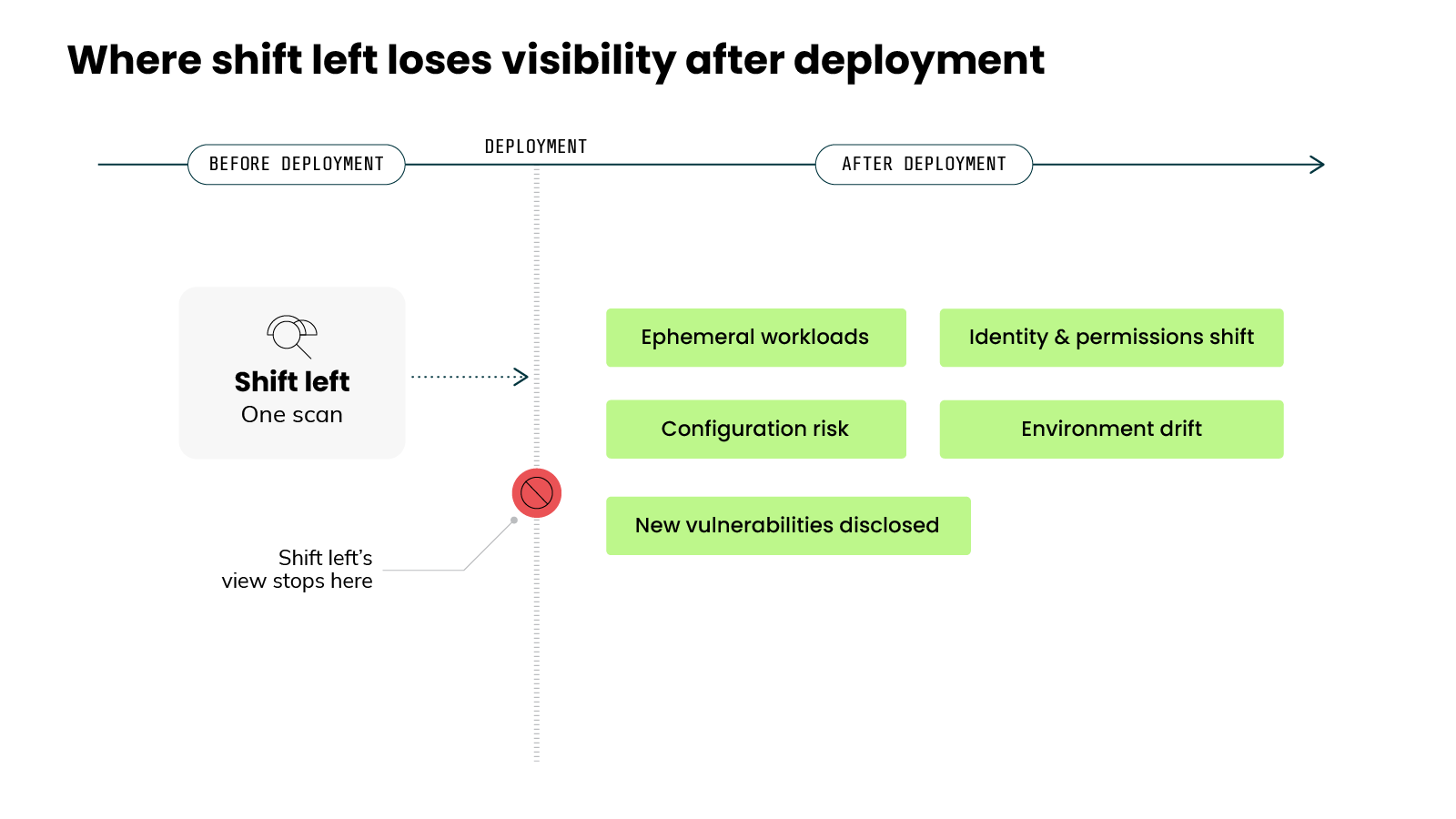
Start with the workloads.
Cloud-native workloads are ephemeral.
Containers start and stop constantly. Some run for only minutes. The thing you scanned in the pipeline may not match what's running right now. And a workload that has already spun up is hard to see.
Then there's identity.
In the cloud, the perimeter isn't the network. It's identity and permissions. Those shift all the time. New roles get granted. Access expands. A workload that was tightly scoped at deployment can gain new privileges later. Shift left never sees that change.
Next, consider configuration.
A lot of your cloud risk isn't in the code at all. It's in how that code gets deployed. A secure image can still ship with a risky setting. Misconfigurations are a common source of cloud compromise. Shift left checks the code. It doesn't always see the configuration that runs it.
Environments also drift.
What runs in production slowly diverges from what was defined and scanned. Settings get changed by hand. Urgent fixes get applied directly. Over time, the live environment no longer matches the pipeline's view of it.
Finally, there's timing.
New vulnerabilities get disclosed every day. Many land against libraries that are already running in production. The scan already passed. The flaw didn't exist when the code shipped. Nothing in the pipeline can catch a vulnerability disclosed after deployment.
Here's the pattern:
Shift left checks your software at one point in time. Before it ships. The cloud keeps changing after that point. So the pipeline's view goes out of date the moment you deploy.
Shift left doesn't break because it's weak. It breaks because it stops watching right when the cloud starts to move.
Why do shift left scans flag so many false positives?
Open a typical scan report. You'll see hundreds of findings. Maybe thousands.
Now the hard question. How many actually matter?
Usually, very few. And that gap is the problem.
Here's why it happens:
A scanner checks what's present. It sees that your project pulls in a vulnerable dependency. So it flags that dependency. That part works as designed.
But presence isn't the same as exposure. A vulnerable package can sit in your project and never run. The specific vulnerable function may never get called. If your code never reaches that function, the flaw can't be exploited through your application.
The scanner doesn't know that. It sees the package and raises the alert.
How big is this gap? Larger than most people expect.
One detailed study looked at the alerts from a set of dependency scanners on a real application. In about 84% of cases, the flagged dependency was not actually used by the application at all. Only a small fraction of the flagged code was ever executed.1
In other words:
Most of what a scanner flags isn't reachable in your specific app. The finding is technically correct. The dependency really does contain a known flaw. But it poses little practical risk to you.
There's a second reason for the noise. Severity isn't the same as likelihood.
Most scanners rank findings by severity. Severity measures how bad a flaw could be if exploited. It doesn't measure how likely that flaw is to be exploited. And only a fraction of known vulnerabilities are ever exploited in the wild.
This is why exploitability-based scoring exists. It estimates the probability that a flaw gets used in a real attack, not just how damaging it would be.
So shift left produces two kinds of noise at once. It flags flaws your code never reaches. And it ranks by potential damage instead of real-world likelihood.
The root cause is the same for both.
The scan runs on static code before anything runs. It can see that a vulnerable package exists. It can't see whether the workload runs, whether the function gets called, or whether the path is exposed.
It's worth noting: there's a technique that narrows this down, called reachability analysis. It helps. But on its own, at the pipeline stage, it still can't confirm what actually executes in production.
The result is familiar to anyone who owns a backlog.
Real risks get buried under findings that were never exploitable. Teams spend hours triaging noise. Trust in the tooling drops. And the few findings that genuinely matter get harder to spot, not easier.
That's the first blind spot. Not too few alerts. Too many of the wrong ones. And the only way to clear the noise is to see what's actually in use. Which is exactly what the pipeline can't do.
→ Continue learning:
Can shift left detect an attack in progress?
So far we've talked about finding flaws before they ship. That's prevention. It's important work.
But flip the question around.
Imagine an attacker is already inside your environment. Right now. Not a flaw that might get exploited someday. An actual intrusion, in progress.
Can shift left see it?
No. And that's the second blind spot.
Here's why:
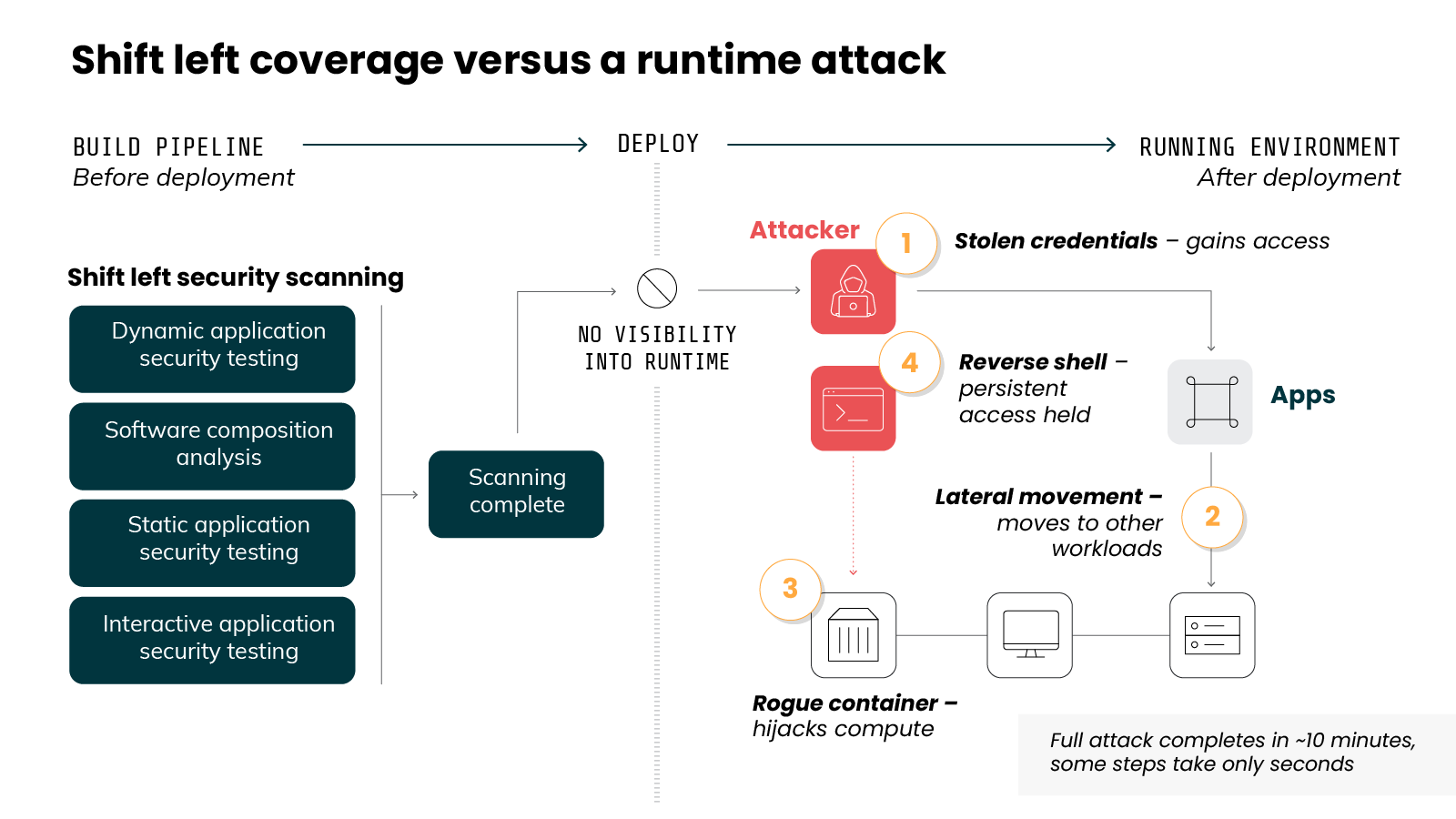
Shift left lives in the build. The attack lives in the running system. Those are two different places. By the time an attacker is active in your environment, the scan is long finished. The pipeline has no presence there. It already did its job and moved on.
There's a deeper reason too. Many attacks leave no trace in your code at all.
Think about how a real cloud intrusion unfolds. A credential gets stolen. A misconfiguration gets exploited while the system runs. An attacker moves from one workload to another. None of these live in your source code. So there's nothing in the pipeline for a scan to catch.
Some attacker actions only exist at runtime. For example:
An attacker deploys a rogue container. They hijack your compute to mine cryptocurrency. They open a reverse shell to keep access. A pre-deploy scan has nothing to inspect here. These actions aren't flaws in your code. They're live behavior in your running system.
Timing makes this harder.
Cloud attacks are fast. Once an attacker finds a way in, they can complete an attack in roughly 10 minutes. Some steps happen in seconds, according to the Sysdig 5/5/5 Benchmark for Cloud Detection and Response. That pace changes what detection has to look like. You need to spot the signal in seconds. Not at the next scan. Not in the next sprint.
Shift left can't operate at that speed. Why not? Because it's a build-time control. It has no presence in the running environment. It's not watching production. It was never designed to.
Which means:
When an attack is actually happening, the pipeline is silent. Not because it failed. Because it's looking in the wrong place, at the wrong time.
That's the second blind spot. The first was about noise. Too many findings, few of them real. This one is about detection. No ability to see a live attack at all.
Notice what both blind spots have in common. Neither is a flaw in shift left itself. Both come from the same limit. Shift left can't see what happens at runtime. And runtime is where risk becomes real.
What is runtime security in cloud environments?
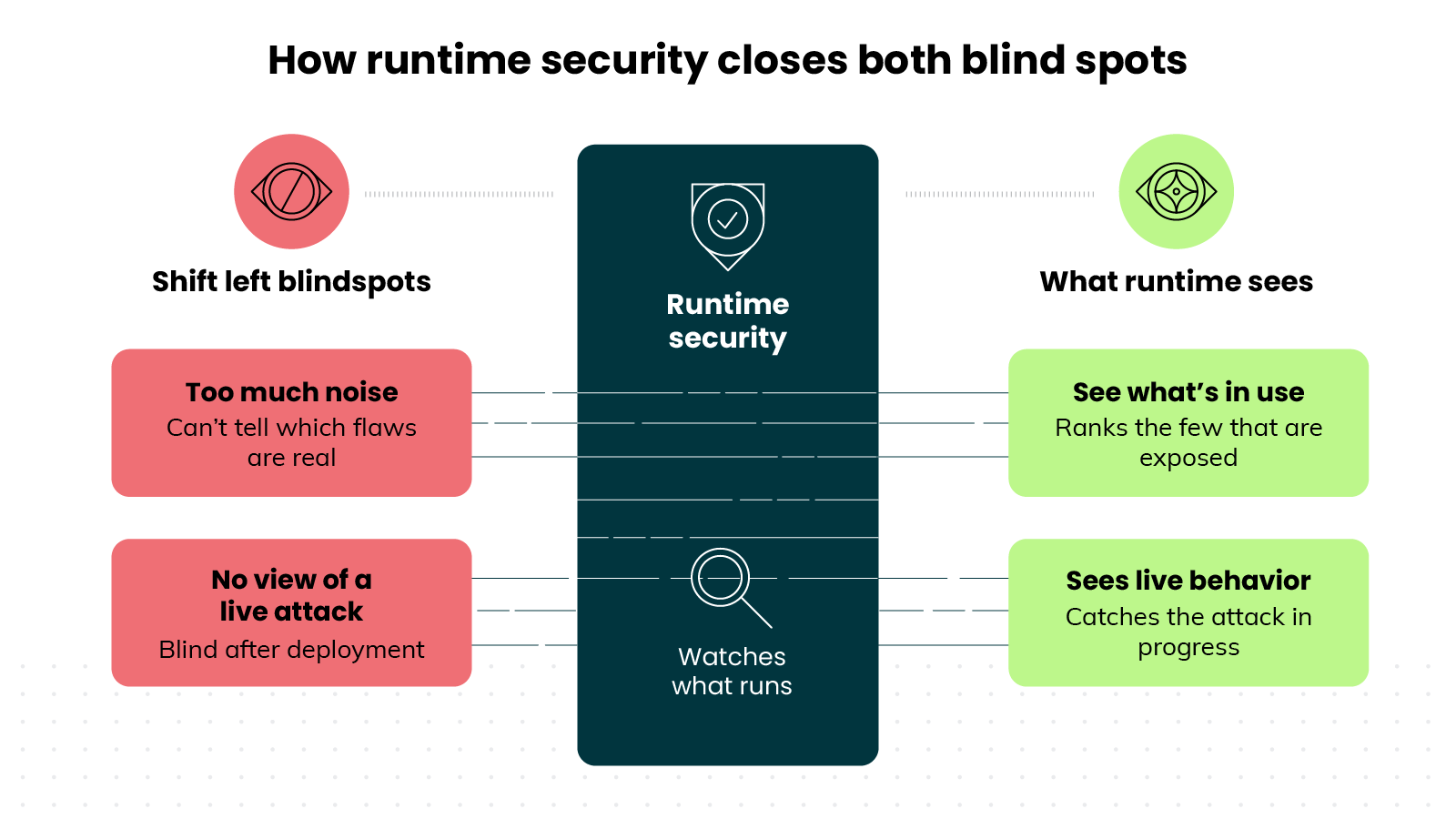
So both problems trace back to the same blind spot. What you need is a way to see what actually runs.
That's a different vantage point. Not a better scanner. One that watches software while it runs.
That's runtime security. And it closes both gaps at once.
Here's the core idea:
Runtime security monitors your workloads as they actually run. Not the code in your pipeline. The live thing, in production, right now.
What does it watch? Behavior.
Every workload does things while it runs. It opens files, starts processes, makes network connections. At the lowest level, each of those actions becomes a system call. A request to the kernel. That stream of activity is the most honest signal you can get. It's not what your code might do. It's what your software is actually doing.
Why does that matter so much? Because it answers both questions the pipeline couldn't.
Take the noise problem first.
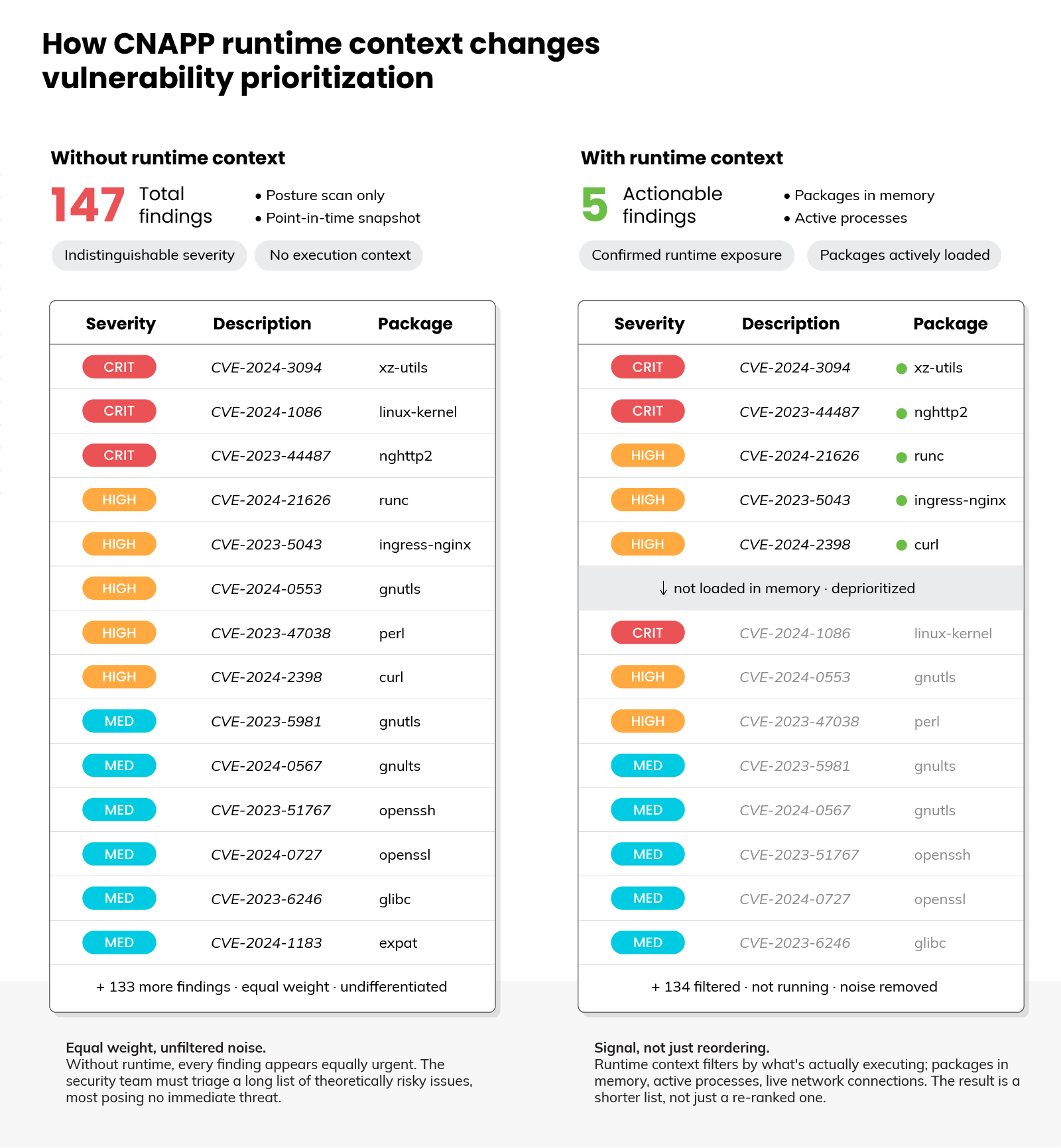
As mentioned earlier, a scanner can't tell which flagged flaws are actually exposed. Runtime can. It sees what's truly in use. A vulnerable package that never loads isn't an active risk. A vulnerable component running in production is. That call is impossible to make from static code. It becomes obvious once you watch what runs.
The scale of that gap is large.
In one analysis of real environments, only about 5.5% of vulnerable container images were actually present in running workloads, per Sysdig's 2026 Cloud-Native Security and Usage Report. Runtime is what surfaces that small, exposed subset. It turns a wall of findings into the short list that genuinely matters.
Now the detection problem.
Because runtime security watches live behavior, it can catch an attack while it happens. A rogue container starting. Compute getting hijacked. A reverse shell opening. None of these show up in code. All of them show up as abnormal behavior in a running system.
This is behavioral detection.
It flags what a workload does, not just whether it matches a known-bad pattern. That difference is what lets it catch new and unexpected attacks, including things a signature has never seen. It's the foundation of what the industry calls cloud detection and response.
So step back and compare the two directly.
Shift left asks one question. Is this code safe before it ships? Runtime security asks another. Is this workload behaving safely right now? Two questions. Two vantage points. Both grounded in the same software, at different moments in its life.
Which raises the obvious next question. If runtime sees everything shift left misses, does it replace shift left?
→ Continue learning:
Does runtime security replace shift left?
Short answer: no.
Runtime security doesn't replace shift left. It completes it. The two solve different problems at different moments. You want both.
Here's why replacing shift left would be a mistake:
Shift left prevents.
It stops known, fixable flaws from ever shipping. That work is real, and it's cheap. We covered this at the start. A flaw fixed in development costs far less than the same flaw handled in production.
Runtime security doesn't do that job.
It watches what already shipped. Drop shift left, and you simply ship more flaws. Then you lean on catching them live. That's slower, riskier, and more expensive. You'd be trading a cheap fix for a costly one.
So this was never an either-or choice.
Think about the full life of your software.
It gets built. Then it runs. Shift left covers the first part. Runtime security covers the second. Together they form a layered approach. Security guidance has recommended exactly this kind of defense in depth for years.
But there's a more interesting point here. The two don't just sit side by side. They make each other better.
Here's how:
You already saw that runtime can tell what's actually in use. That's exactly what shift left's backlog is missing.
Runtime ranks it: the flaws running in production rise, the ones that never load drop. A prioritized list instead of an overwhelming one.
It works the other way too. Every flaw shift left prevents is one less thing for runtime to catch later. Good prevention lightens the load on detection.
In other words:
They're not competitors. They're two halves of the same job.
That's the position worth holding. Not shift left versus runtime. Shift left plus runtime.
And this balance is about to be tested. Because the amount of code shipping into production is growing fast. Faster than any review gate was designed to handle. The reason is AI.
How does AI-generated code affect shift left?
AI writes code now. A lot of it. Developers use assistants to generate functions, fix bugs, and ship features faster than before. That's a real productivity gain. It's also a new source of risk.
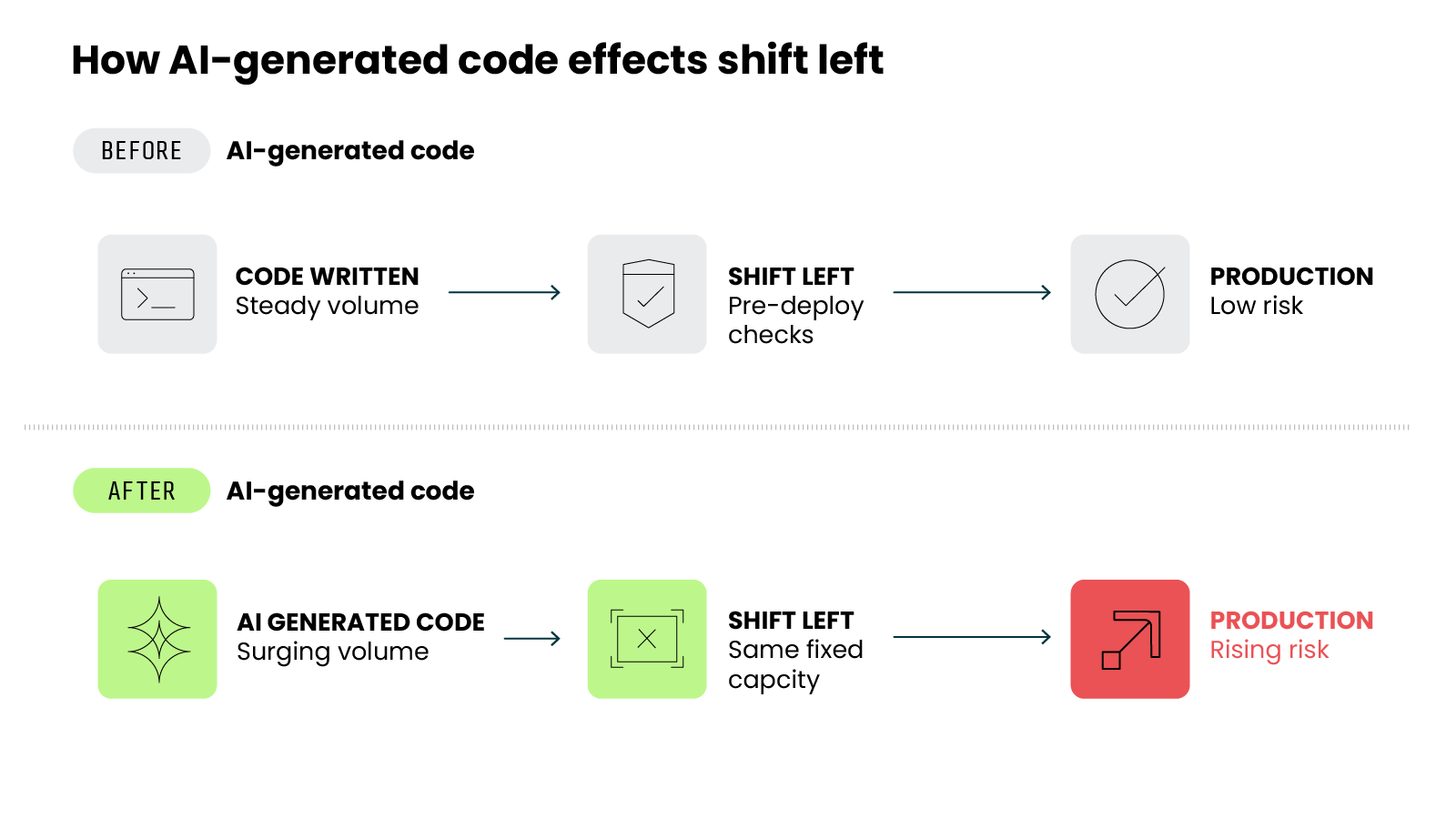
First there's the sheer volume.
More code gets written.
So more code needs review. Shift left has to check all of it. And much of this code lands in cloud-native environments. The output goes straight to where the risk already lives.
Now the harder problem. AI-generated code isn't always safe.
The research points the same direction.
In one large study, researchers used formal verification to check AI-generated programs. At least 62% of the programs they examined contained security flaws. The models weren't trying to write insecure code. They just reproduced the patterns they learned. And a lot of those patterns are flawed.2
There's a human factor too. And it makes things worse.
Developers who used AI assistants tended to write less secure code. That part's measurable. But here's the concerning part. Those same developers were more likely to believe their code was secure. Weaker code. Higher confidence. At the same time.3
Put these together:
Code volume is climbing. A meaningful share of that code carries flaws. And the people shipping it are often more confident than they should be. All three trends point the same direction. More risk reaches production, faster than before.
So what does this do to shift left?
It raises the load. Shift left now has to catch more code, more flaws, and more misplaced confidence. The pipeline wasn't designed for this volume. Some insecure code will get through. Not because shift left is broken. Because the input is growing faster than any pre-deploy gate can handle.
Which brings us back to the point.
When more slips past the build, what runs in production matters even more. Shift left still does its job. It just can't be the only line of defense. The more code AI ships, the greater the need for something watching what actually runs.
→ Continue learning: Top 7 AI Security Risks
How do you combine shift left and runtime security?
By now the answer should feel clear. You don't pick one. You run both. But running both is not the same as connecting them. Most teams already do some of each. The value comes from letting one inform the other.
Think of it as two layers, connected.
- Prevent early.
Keep scanning code, dependencies, and configurations before they ship. This is the cheapest place to fix a flaw, so catch everything you reasonably can here. This layer doesn't change. It's the foundation. - Prioritize with runtime.
Your scanner will still surface more findings than any team can chase. This is where runtime earns its place. What's actually running in production tells you which findings are real. Fix those first. Let the ones that never load fall down the list. A ranked backlog instead of an endless one. - Detect what prevention can't see.
Runtime is also your only view of the risks that never touch code, the live attacks and post-deploy exposures from earlier. Here, that becomes a standing job. Treat runtime as your detection and response layer, not just a second scan.
That's the combination.
Prevention decides what ships. Runtime shows what's real and catches what prevention missed.
A practical way to start: if you already run shift left, you have the prevention layer. The gap is almost always the runtime layer. So the first move is usually not more scanning. It's adding visibility into what's actually running.
This matters more every year. Again, AI is pushing more code into production, faster than any build gate can fully check. Prevention alone just can't keep that pace. The runtime view is what catches what slips through.
Which brings us back to where we started.
Shift left is necessary. It's also not enough in the cloud. Not because it fails. Because it stops watching at deployment. And in the cloud, that's exactly when risk starts to move.
Runtime security covers that gap. It doesn't replace shift left. It completes it.
Secure the build. Then watch what runs. That's how you cover the whole picture.
→ Continue learning: What Is CNAPP? [The Definitive Guide]
Limitations of shift left in cloud environments FAQs
Blog: Closing the cloud security gap with runtime security