Bringing OSS runtime security to AWS: Falco integration with AWS Security Hub CSPM



Falco Feeds extends the power of Falco by giving open source-focused companies access to expert-written rules that are continuously updated as new threats are discovered.
Security in cloud-native environments starts with knowing what is happening at runtime. With containers, usually orchestrated by Kubernetes, powering modern applications, from AI-driven workloads to traditional services, teams must maintain visibility into ephemeral containers that may exist for seconds or run for hours. This is where runtime security becomes essential, and where Falco fills a critical gap.
What is Falco?
Falco is a CNCF-graduated open-source project that provides runtime security for cloud-native environments. Falco monitors your containers at the kernel level using eBPF probes to detect suspicious behavior in real-time.
Think of Falco as a security camera for your workloads, it watches for activities like:
- Unexpected shell spawns inside containers
- Access to sensitive files (like
/etc/shadow) - Unusual network connections
- Privilege escalation attempts
- Modifications to critical system files
- …
When Falco detects these behaviors, it generates alerts based on customizable rules. The default ruleset coming with Falco is aligned with frameworks like MITRE ATT&CK.
For a deeper dive into Falco's capabilities, components and more, check out this Falco blogpost.
The challenge: Making OSS runtime security AWS-native
Setting up Falco with security tools like AWS Security Hub CSPM can be a significant effort, requiring the configuration of multiple AWS services and Kubernetes resources:
- Deploy Falco along with a log forwarder (FalcoSidekick) on your Amazon Elastic Kubernetes Service (EKS) cluster with proper configuration
- Manage the entire deployment lifecycle (Helm Charts and Stacks with CloudFormation)
- Configure AWS CloudWatch Log Groups and streams
- Set up proper IAM roles and permissions across all services
- Create and configure Lambda functions to transform raw data from Falco logs’ for sending to AWS Security Hub CSPM using the AWS Security Finding Format (ASFF) standard.
Getting this workflow fully operational takes time, and that's before automating it within an AWS CloudFormation stack.
Wait…what is AWS Security Hub CSPM?
AWS Security Hub CSPM (Cloud Security Posture Management) is AWS's unified security dashboard that consolidates findings from multiple sources. Here's why it's the ideal destination for Falco alerts:
Single Pane of Glass: Instead of managing separate dashboards for different security tools, Security Hub CSPM brings everything together. Falco alerts will appear alongside findings from GuardDuty, Inspector, Macie, and other security services that you have configured.
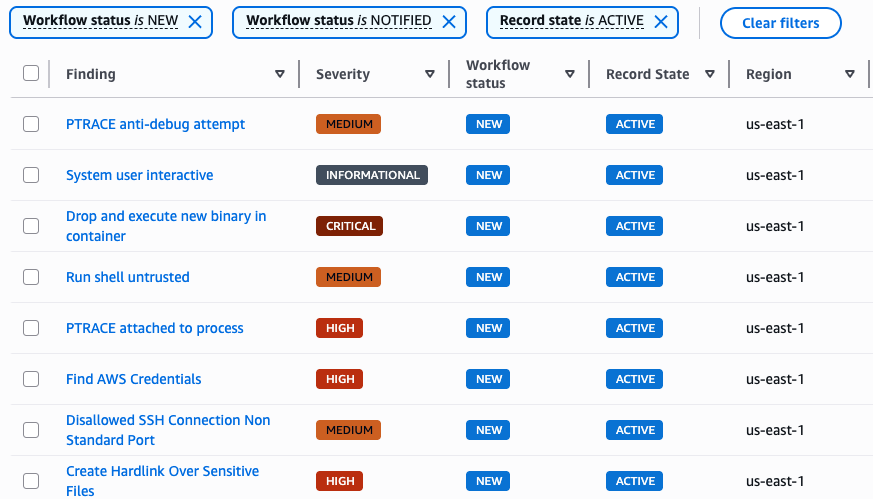
Built-in Workflow Management: Filter findings by severity (Critical, High, Medium, Informational), track workflow status (New, Notified, Resolved), and maintain record states (Active, Archived, etc.).
Compliance Alignment: AWS Security Hub CSPM supports standards like CIS AWS Foundations Benchmark, PCI DSS, and more, helping you map security findings to compliance requirements.
Automation Support: Integrate with EventBridge to trigger automated responses. Create tickets in your ITSM, send Slack notifications, or kick off remediation workflows.
The solution: Falco + AWS Security Hub CSPM integration via AWS Marketplace
This solution eliminates the need for a DIY integration by deploying through the AWS Marketplace:
Step 1: Search and Subscribe
Find "Cloud Native Security with Falco (CSPM Integration)" in the AWS Marketplace and subscribe with a single click.
Step 2: Self-Service Deployment
Launch the deployment workflow directly from the Marketplace by providing your EKS cluster name and networking details needed to deploy the EC2 (bootstrap VM) instance.
Step 3: Automated Configuration
The solution automatically:
- Deploys Falco to your specified EKS cluster
- Provisions all required AWS resources (CloudWatch, Lambda, IAM roles)
- Establishes the integration pipeline
- Enables AWS Security Hub CSPM in your account
Step 4: Immediate Value
Within minutes, runtime security findings from your EKS cluster are visible in your AWS Security Hub CSPM dashboard, ready for triage and response.
How it works
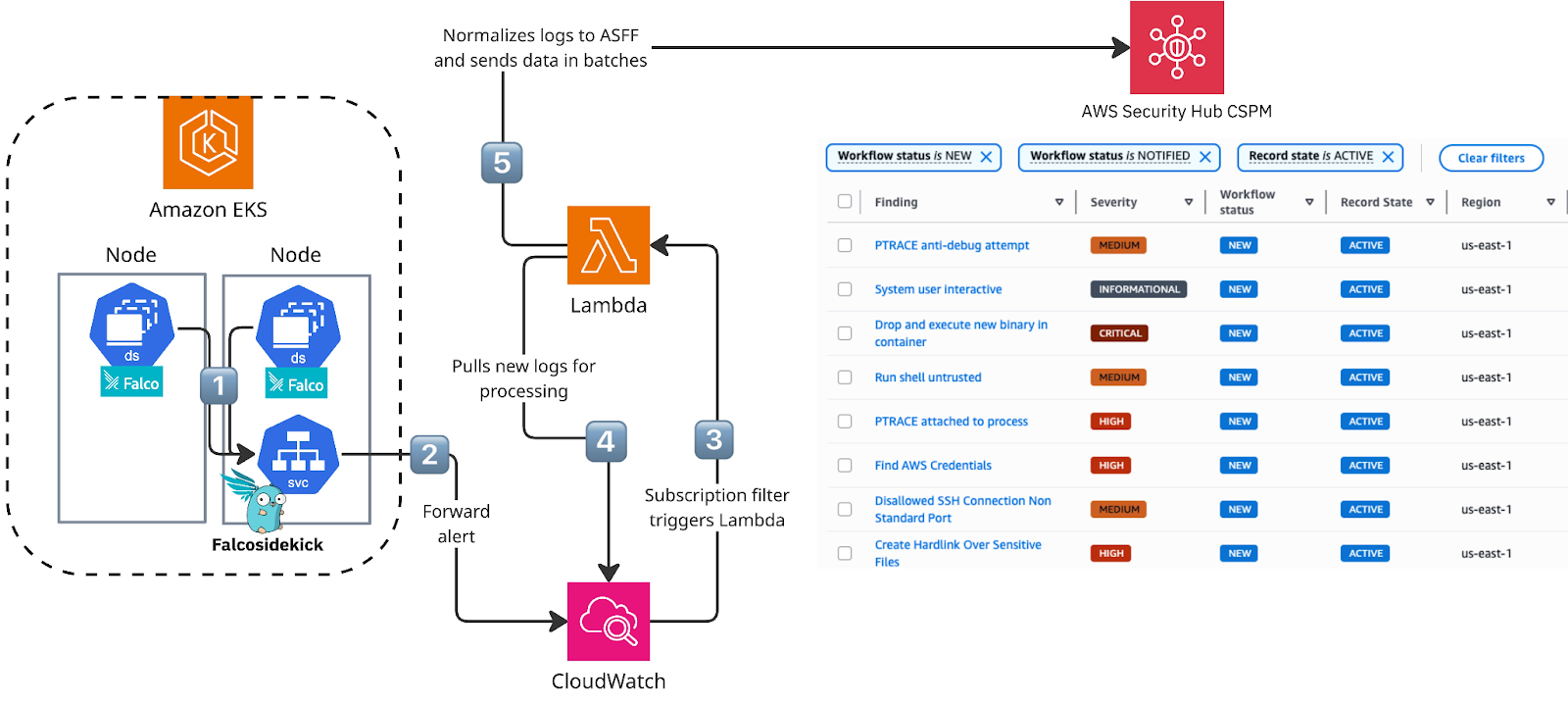
The solution follows a streamlined workflow:
- Falco runs on every node in your EKS cluster, monitoring syscalls at the kernel level. When an event matches a rule (coming from the default ruleset), it will be sent to FalcoSidekick.
- FalcoSidekick aggregates alerts and forwards them to CloudWatch (in specific LogGroup paths)
- CloudWatch subscription filters trigger a Lambda function when new alerts arrive
- Lambda transforms the data from Cloudwatch into AWS Security Finding Format (ASFF) and forwards it to AWS Security Hub CSPM
- Security findings appear in AWS Security Hub CSPM where you can view, filter, and act on them
Real-world detection examples
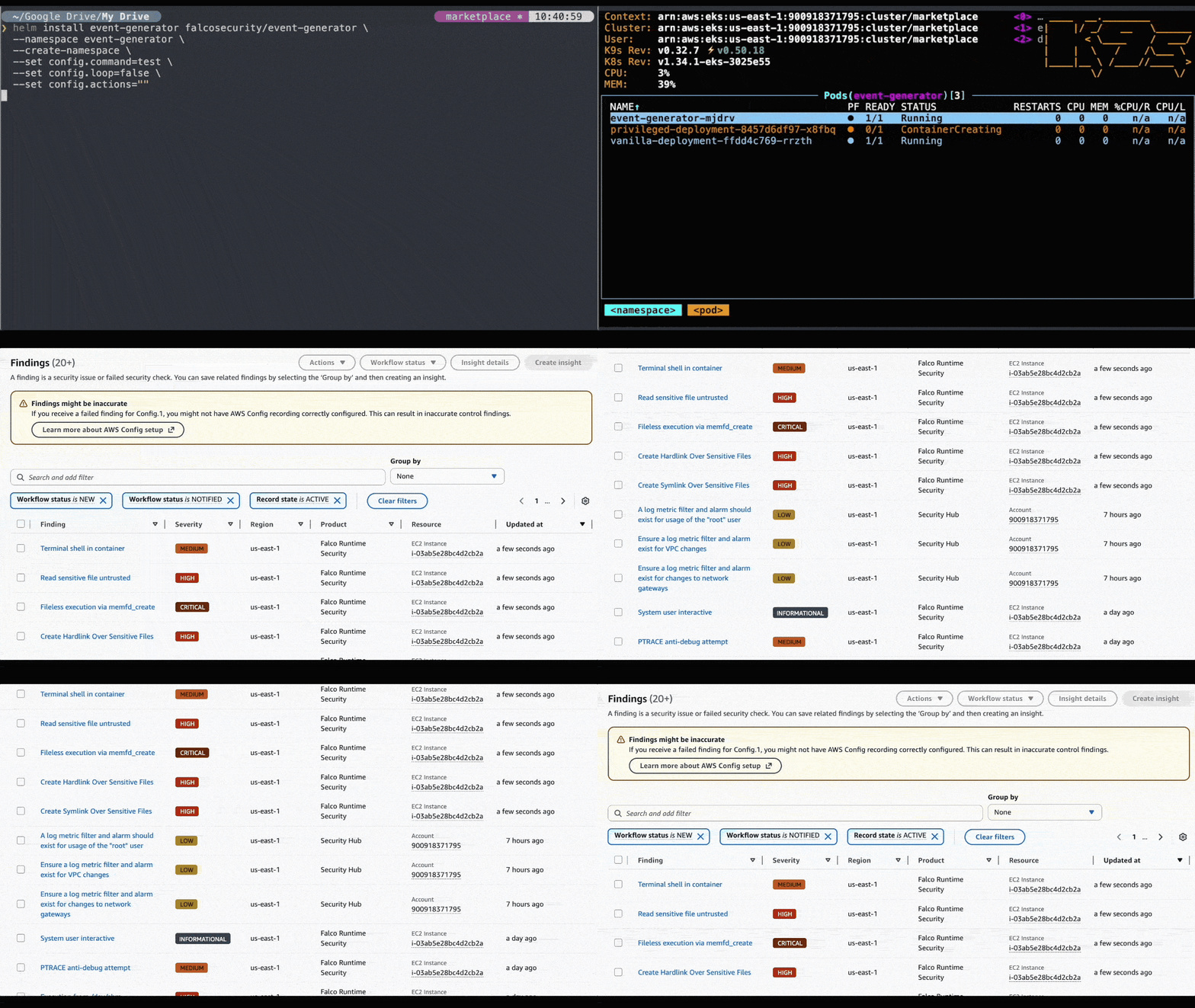
Once deployed, the solution immediately detects and reports various security threats coming from the default rule set like:
- Shell spawned in container: Detects potential malicious interactive access to containers
- Sensitive file access: Alerts when processes read critical files like
/etc/shadow - Unexpected K8s API connections: Identifies unusual communication patterns with the Kubernetes API
- Privilege escalation attempts: Catches attempts to gain elevated permissions
- Suspicious network activity: Monitors for unusual network connections from containers
All these detections appear as properly categorized findings in AWS Security Hub CSPM with appropriate severity levels, contextual information, and actionable details.
Who should use this?
This solution is ideal for:
- DevOps teams running EKS clusters who want runtime security without the setup overhead
- Security teams looking to consolidate threat detection in AWS Security Hub CSPM
- Organizations that want open-source security tools with enterprise-grade integration
- Companies evaluating runtime security before committing to commercial CNAPP solutions
Getting started
The solution is available in AWS Marketplace. Search for "Cloud Native Security with Falco (CSPM Integration)" and look for the Falco logo. Deployment requires:
- An existing EKS cluster
- A VPC with internet access and EKS cluster connectivity
- AWS Security Hub CSPM enabled (or the solution can enable it for you)
From there, CloudFormation handles everything: IAM roles and permissions, Lambda function, log groups, and the Falco Helm chart deployment to your cluster.
Do you want more details or want to contribute to this solution? Check our Github repository to know how this AWS Marketplace solution works.
Conclusion
Runtime security shouldn't be optional, and it shouldn't take weeks to deploy.
Our AWS Marketplace solution brings Falco's powerful open-source runtime detection directly into AWS Security Hub CSPM, securing your environment from runtime threats after a 10-minute deployment.
Key Benefits:
- Open-source transparency: Falco is CNCF-graduated with an active community
- Native AWS integration: Findings flow directly into AWS Security Hub CSPM
- Automated deployment: No manual infrastructure setup required, just a functional EKS cluster
- Immediate value: Start detecting runtime threats within minutes of deployment (recommended to tune your rules as per your business needs)
Ready to test runtime security on your first EKS cluster? Find us in the AWS Marketplace.
Questions about the integration or want to learn more about Falco? Join our community.