



Falco Feeds extends the power of Falco by giving open source-focused companies access to expert-written rules that are continuously updated as new threats are discovered.
Cloud defenders constantly face fast-moving security threats. Signals pour in from containers, Kubernetes, cloud services, and identities and security teams are left asking the same questions over and over:
- What do all these alerts mean?
- Which are related to the same incident?
- What is at risk?
- What should we do next?
To help analysts work at the incident level rather than drowning in raw alerts, Threat Management in Sysdig Secure consolidates related, high-confidence runtime events into a single, actionable security incident. Sysdig Sage™ takes that experience a step further, providing AI-generated threat summaries and a conversational assistant that helps teams understand and respond faster.
AI assistance for threat management
Sysdig Sage for Threats is an AI-powered enhancement to the Threats module in Sysdig Secure. It enriches each recorded threat with:
- An AI-generated title that provides a plain-language description of the threat.
- A three-bullet summary that explains what’s happening, why it matters, and who or what is impacted.
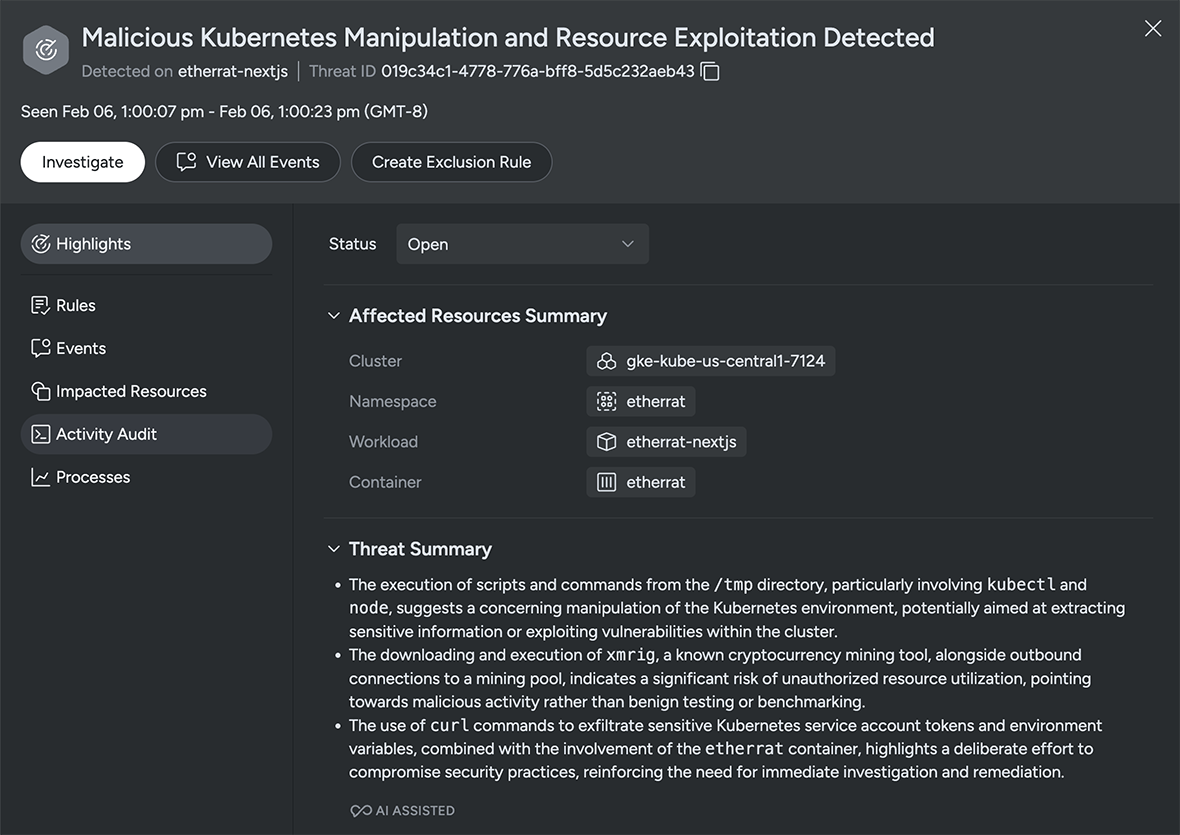
Three bullets that improve cloud threat triage
You can think of the AI-generated bullets as dynamically generated insights that answer three core questions:
- What’s happening?
- Why does it matter?
- Who or what is affected?
Cloud defenders don’t have time to waste. Having a concise description of the suspicious behavior or attack pattern, as well as the scope, such as which clusters, cloud accounts, or identities are involved in the threat, helps teams prioritize issues and respond faster.
For teams contending with a large number of alerts, Sysdig Sage summaries help quickly scan threats to decide:
- Is this a significant risk to production applications and sensitive data?
- Is this a benign activity in a dev or test environment?
- Which team needs to know about this?
Investigation by conversation: Chatting about threats
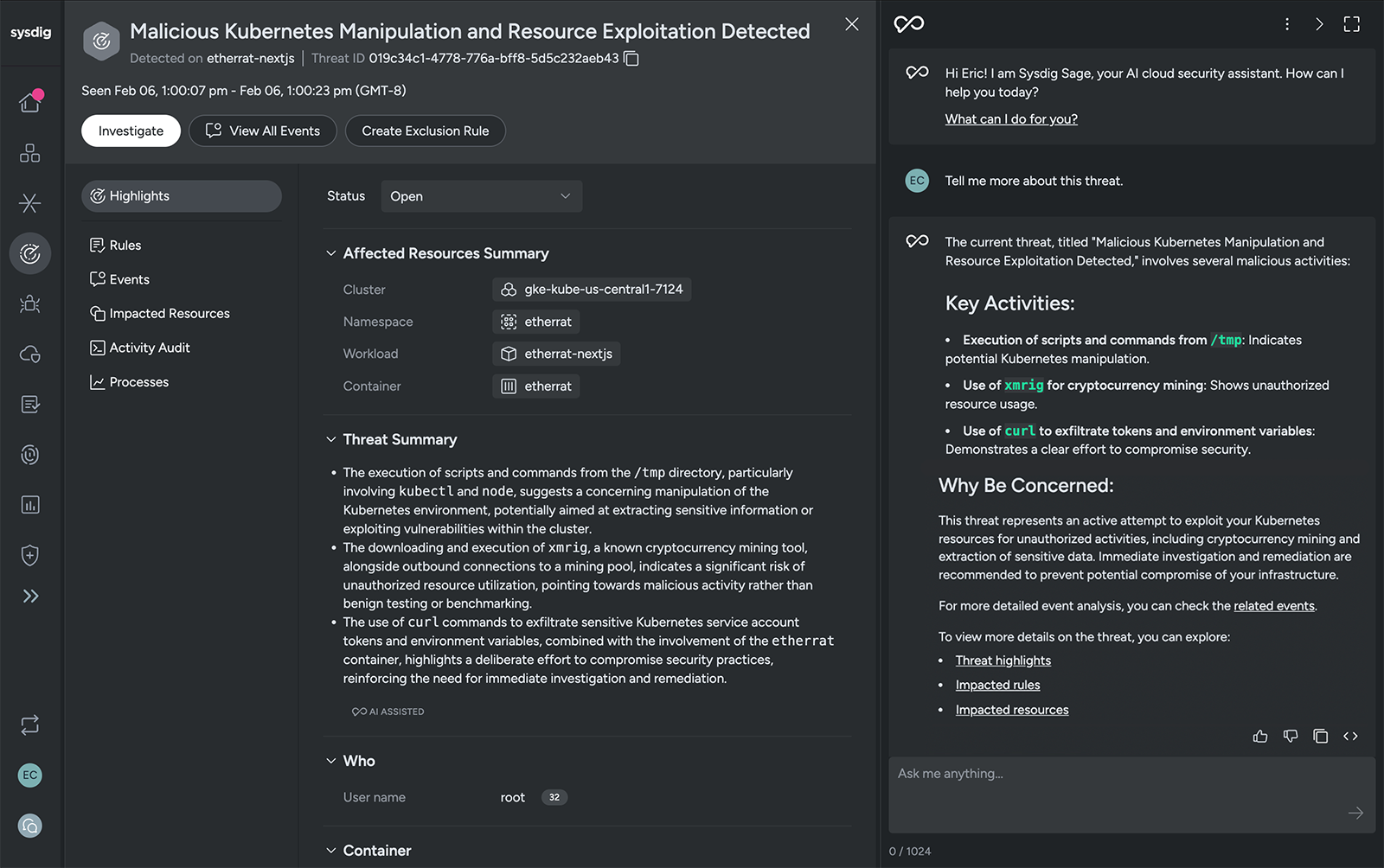
The second way Sysdig Sage enhances the Threats experience is through an embedded chat assistant. It is context-aware, so it knows which threat entry you’re viewing. You can use the chat assistant to ask for further threat details, explain rules and events, list related runtime events, show impacted resources, and suggest next steps for response and hardening.
Below are some concrete ways teams can use the chat to accelerate their threat workflow.
Explaining a threat in plain language
The three bullets generated for each threat give you a concise overview. Sometimes you still want to know more. Using natural language, you can start with a simple question and then drill down with follow-ups as you learn more. You can ask Sysdig Sage for more details with a simple prompt such as, “Tell me more about this threat.”
With contextual awareness, Sysdig Sage knows what threat you’re viewing and will expand on the AI-generated summary. It synthesizes information from the Sysdig platform and, in addition, draws upon the wealth of knowledge from its backing AI model. Armed with this information, it will return a narrative explanation of the activity, the techniques involved, and why it matters.
To understand what triggered an alert and the tactics being executed by an attacker, you can ask, “Explain this rule and what the attacker is trying to do.” Sysdig Sage brings you valuable intelligence. It can reflect insights aligned with the tactics and techniques outlined in the MITRE ATT&CK framework, helping teams stay ahead in the battle to protect critical systems.
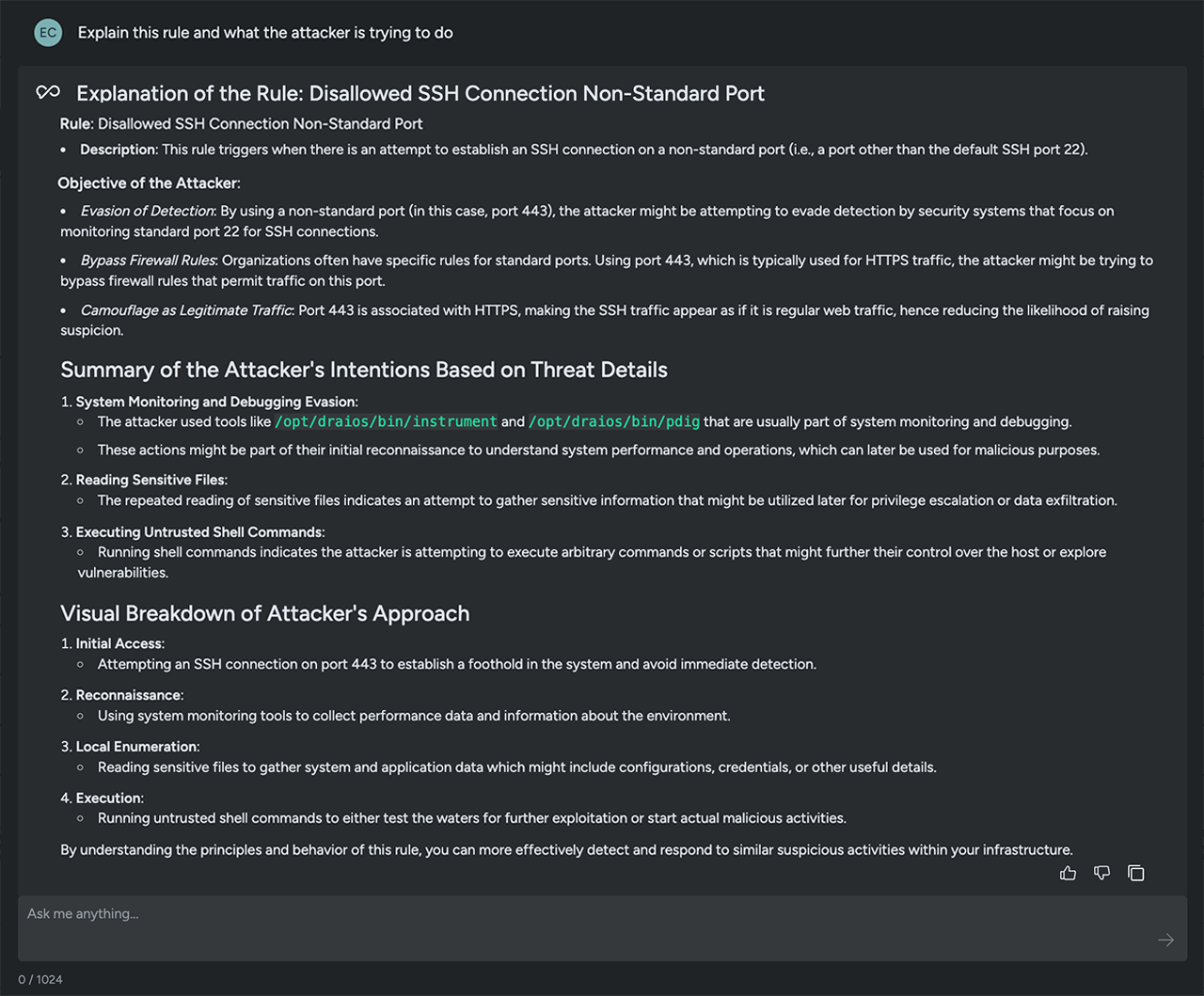
Another option is to ask Sysdig Sage to summarize the existing threats. This gives you an easy-to-read digest of the type of concerning behaviors happening in your environment. You can use a prompt like, “Show me the top 5 threats based on potential impact,” to get an AI-based opinion on the issues that pose the greatest risk.
This is ideal for:
- Prioritizing the threats that appear in your threat feed.
- Identifying recurring issues that can be addressed by improving your security practices.
- Summarizing issues for executives or stakeholders who request a threat status summary.
Navigating between events and threats
Investigations rarely move in a straight line. You may start from a suspicious event and work your way up to a threat, or begin at the threat and dive into the raw events behind it.
Sysdig Sage for Threats supports this bidirectional exploration through chat.
Example prompts:
- From an event: “What threat is this runtime event associated with?”
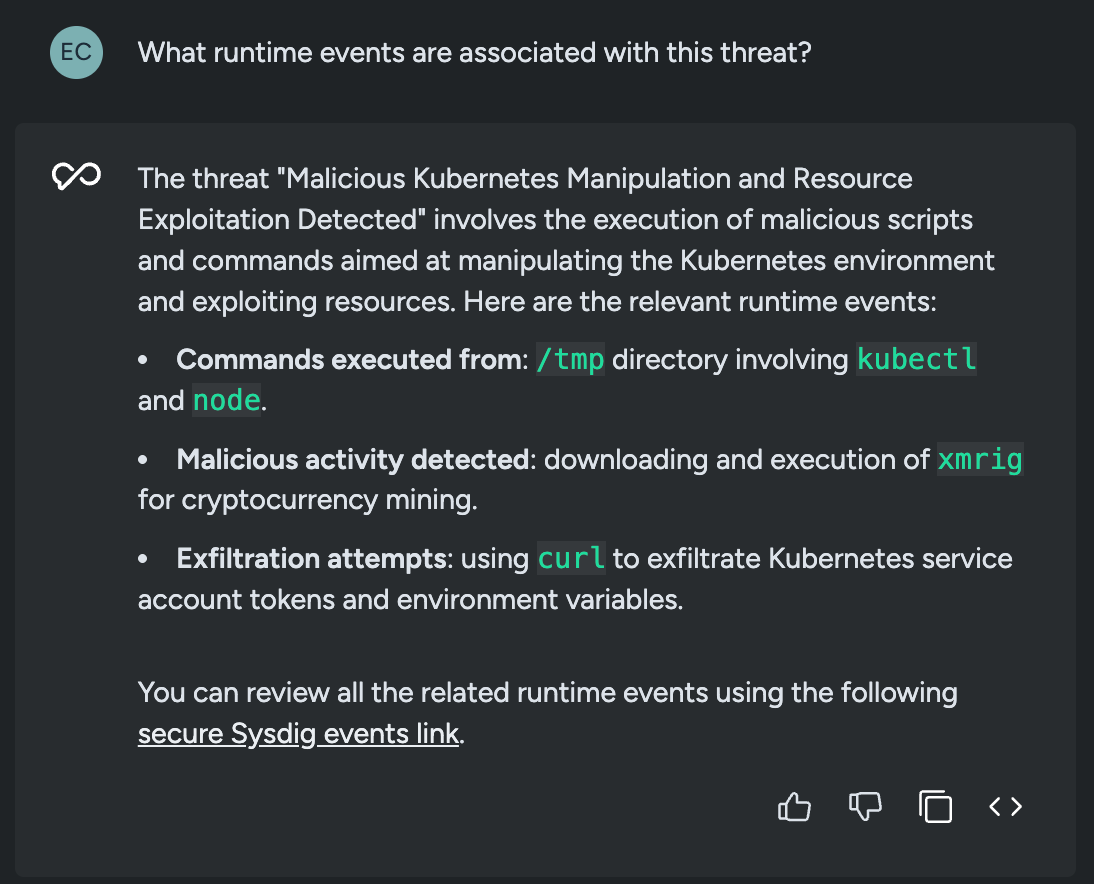
- From a threat: “What runtime events are associated with this threat?”
- While investigating: “Show me more details about this threat” or “Expand event details.”
In response, Sysdig Sage will:
- Identify whether the runtime event is part of an existing threat and provide a direct link back to that threat.
- Retrieve and display a list of events tied to the selected threat, with navigation back to individual event details.
- Help you expand and explore relevant details in the UI without hunting through filters.
The result is less time spent clicking around the console and more time actually understanding what a potential attacker is doing.
Scoping the impact of a threat
Knowing a threat exists is only half the battle. You also need to understand scope and impact:
- Which clusters or namespaces are involved?
- Is a critical service or high-sensitivity environment affected?
- Are any particular identities, roles, or cloud accounts implicated?
AI helps here, even with a simple question such as, “Who/what is impacted by this threat?”
Sysdig Sage responds by surfacing impacted resources and identity info — such as clusters, hosts, identities, cloud users, or cloud services — so analysts can quickly understand the blast radius and decide whether to escalate.
This is where the Threats module and Sysdig Sage intersect with the broader CNAPP context. The assistant can reference the same entities and metadata that the Threats engine used to build the threat in the first place, giving you an impact view rooted in real runtime behavior.
Asking for guidance on threat response
Understanding a threat is only valuable if it leads to action. Sysdig Sage is designed not just to describe what’s happening, but to help you figure out what to do about it.
Across Sysdig Secure, AI provides guidance on remediation and response. For runtime events, it explains what caused the event and offers suggestions for next steps to mitigate it. For vulnerable container images, AI recommends targeted fixes with step-by-step instructions. The same principles apply when you use the assistant from the Threats view.
Here are a few useful prompts focused on response:
Example prompts:
- “What should I do to stop this threat?”
- “What are my options to respond to this threat?”
- “Give me step-by-step guidance to remediate and prevent this type of threat.”
When you ask these types of questions about a threat, Sysdig Sage can:
- Suggest immediate containment ideas, such as isolating or restarting workloads, revoking suspicious credentials, or tightening network access.
- Recommend hardening and prevention steps, such as improving IAM policies, Kubernetes RBAC, or configuration baselines.
- Advise on practices your team should adopt to reduce the chance of a repeat incident.
Sysdig Sage essentially gives you a playbook you can use to:
- Take immediate action
- Open tickets with clear context.
- Share concise, actionable guidance with other teams
A day in the life with Sysdig Sage for Threats
To see how this comes together, imagine a typical morning for a cloud threat responder:
- Log in and scan threats. Open the Threats page in Sysdig Secure and review the titles and summaries to identify the most concerning issues.
- Ask for context. Type: “Tell me more about this threat and who it impacts.”
Sysdig Sage highlights the behavior it detected and which services and accounts are at risk. - Drill into the evidence. You want to see how it started, so you ask: “What runtime events are associated with this threat?” Sysdig Sage lists the relevant events and helps you navigate in the UI to view the details.
- Clarify a response plan. “How should I respond to block this threat?” Sysdig Sage walks you through steps to guide your immediate and longer-term threat response.
- Share the plan. Using the context and details generated by Sysdig, you can share a summary and even create a ticket with suggested actions.
What previously required pivoting across dashboards, manual note-taking, and hallway conversations becomes a single, continuous workflow driven by AI-assisted summaries and conversations.
Why it matters for your team
Sysdig Sage AI assistance with cloud and container threat delivers three big benefits:
- Faster time to understand. AI-generated titles and three-bullet summaries help analysts quickly grasp what a threat is, why it matters, and who it affects — without having to decipher raw events.
- Investigation by conversation. The Sysdig Sage assistant lets you move fluidly between threats and runtime events, asking natural-language questions about context, impact, and relationships.
- Guided response, built in. With multi-step reasoning and domain-specific knowledge, Sage can suggest response options, prevention strategies, and process improvements — essentially acting like a cloud security analyst embedded in your Threats view.
All of this is grounded in the real-time runtime visibility and threat detection that Sysdig already provides, so AI is working with high-fidelity signals instead of shallow or siloed data.
Get started
If you’re already using Sysdig Secure, once you enable Sysdig Sage, you’ll have access to AI assistance across the platform. If you’re not a customer, connect with us to request a demo or check out our product tour. You’ll see how quickly AI-powered insights can turn a wall of threat data into a clear, guided path from detection to response.
Blog: AI coding agents are running on your machines — Do you know what they're doing?
Learn how Sysdig detects prompt injection against AI coding agents at the syscall level.

Blog: How agentic AI is changing cloud security
Discover why cloud security is a great use case for agentic AI.
Report: AIBOM: The infrastructure, risks, and how to secure AI models
Get the facts on the security risks hiding in your AI systems.
Product: Sysdig Headless Cloud Security
Start exploring cloud security without the UI.