The expendable extension name: Azure VMAccess naming chaos, password resets, and a detection gap





Falco Feeds extends the power of Falco by giving open source-focused companies access to expert-written rules that are continuously updated as new threats are discovered.
In early April, the Sysdig Threat Research Team (TRT) identified a detection flaw in the process for Azure VM password resets and VMAccess naming. This flaw allows attackers to assign any name to Azure VM extensions, giving them the ability to obtain read/write access, change passwords, and persist in the victim environment without being detected. Additionally, the Sysdig TRT found that the telemetry documented by the Azure Threat Matrix for this detection did not fire when the event was triggered. We promptly reported these issues to Microsoft upon identification. Their official response is:
“Upon investigation, we have determined that this is not considered a security vulnerability because resource names are always user specified.“
This report details the Sysdig TRT’s findings and explores detection recommendations.
VM extensions as an attack surface
Azure VM extensions are programs that run on virtual machines to perform post-deployment configuration and management tasks. They execute with elevated privileges on the VM and are deployed through the Azure control plane, meaning anyone with the right ARM (Azure Resource Manager) permissions can push code or configuration changes to a VM without needing OS-level access.
Security researchers have documented VM extension abuse extensively. NetSPI published research on using extensions like CustomScriptExtension and RunCommand for lateral movement and code execution in Azure environments. Microsoft's own Azure Threat Matrix mapping recognizes VM extensions as a vector for execution and persistence. Furthermore, enterprise cloud security tools like Sysdig Secure ship detection rules that alert on suspicious extension deployments.
The VMAccess extension is particularly sensitive: It resets passwords and SSH keys on VMs, and through this flaw, allows an attacker to reset the password and maintain persistence in the environment. On Linux, the extension type is VMAccessForLinux (publisher: Microsoft.OSTCExtensions). On Windows, it's VMAccessAgent (publisher: Microsoft.Compute). These may be two different extensions from two different publishers, but conceptually, it’s the same operation.
Detection rules for VMAccess typically match on the extension resource name in the activity log's resourceId or entity field, looking for strings like enablevmaccess, VMAccessForLinux, or VMAccessAgent.
Flaws in detecting a password reset on an Azure VM
In theory, an Azure VM password reset should be straightforward. It goes through the Azure Resource Manager (ARM) control plane, which writes to the Azure Activity Log as Microsoft.Compute/virtualMachines/extensions/write. The VM extension that enables the password reset has a known name. Write a detection rule that matches the name and the job is done. But what’s true in theory is not always true in practice.
The VM extension doesn't have just one known name. It has at least three, which it uses interchangeably. And as it turns out, it can have any name at all depending on which tool is used to reset it — including names that no detection rule will ever match — so there’s no limit to your naming creativity here.
To further complicate matters, the activity log for a successful extension write does not include the extension publisher or type. The only identifying information is the caller-controlled resource name and a generic operation string. Any attacker who can write a VM extension can reset credentials and name the operation whatever they want, and default detection rules will never see it.
Host and network-level logging for VMS (e.g., Windows event logs and /var/log) are also not passed to Azure by default. Instead, they must be configured for each VM. That means if you lose control of the VM, Azure will not notify you of what the attacker is doing inside that VM unless you've set up this additional logging beforehand.
According to the Azure Threat Matrix, users are supposed to detect this password reset via an event containing the operation name “Validate Deployment,” where Properties_d has 'vmaccesswindowspasswordreset'. However, this detection never fired in any of the tests performed by the Sysdig TRT in April 2026.
Three teams, three names
When a VM extension is deployed via the ARM API, the URL follows this pattern:
PUT .../virtualMachines/{vm}/extensions/{name}That final {name} segment is the extension resource name, and the value that appears in activity logs. Three Microsoft tools disagree on what that name should be.
The Azure Portal
The Portal always deploys VMAccess with the resource name enablevmAccess, on both Linux and Windows VMs, regardless of what is already installed.
The Azure CLI
The Azure CLI source code at azure-cli/src/azure-cli/azure/cli/command_modules/vm/custom.py has hardcoded the same enablevmAccess value since July 2, 2016 (PR #482):
# Use the same name by portal, so people can update from both cli and portal
# (VM doesn't allow multiple handlers for the same extension)
_ACCESS_EXT_HANDLER_NAME = 'enablevmaccess'
However, in March 2017 (PR #2395), the CLI team added a function called _get_extension_instance_name() that checks whether the VM already has the extension installed under a different name and, if so, reuses that name instead of the hardcoded constant. The stated rationale: "Otherwise, vm agent might reject for more than 2 handlers." This means the CLI might send enablevmaccess or VMAccessAgent, depending on the VM's history.
The documentation
The official Microsoft Learn documentation for VMAccess has never used enablevmaccess in any CLI, PowerShell, or ARM template example. Going back to the very first version of the docs in April 2016 (commit 2fde0e40bf), every example uses the extension type name: VMAccessForLinux for Linux, `VMAccessAgent for Windows.
The string enablevmaccess did not appear in the docs at all until March 2025, and then only as part of verbatim Azure error messages in a troubleshooting table, not as a recommendation.
The documents predate the CLI constant by three months, and show a clear lineage of fractured naming practices.
The challenge
Azure enforces a constraint: one extension resource per handler type per VM. If the Portal installed VMAccess as enablevmAccess and a user later follows the documentation and deploys it as VMAccessForLinux, Azure rejects the request with a 400 BadRequest: "Multiple VMExtensions per handler not supported."
The name, however, is also arbitrary. The cross-tool testing established that the extension resource name varies by tool. That led to the question the Sysdig TRT explored next: Does Azure validate the name?
The VMAccess extension was deployed to a clean Linux VM via the AZ CLI with no existing VMAccess handler, using a completely arbitrary resource name:
az rest --method PUT \
  --url ".../extensions/my-custom-name-12345?api-version=2024-07-01" \
  --body '{
    "location": "eastus",
    "properties": {
      "publisher": "Microsoft.OSTCExtensions",
      "type": "VMAccessForLinux",
      "typeHandlerVersion": "1.5",
      "autoUpgradeMinorVersion": true,
      "settings": {},
      "protectedSettings": {
        "username": "azureuser",
        "password": "********"
      }
    }
  }'
Azure accepted my-custom-name-12345, the password was reset, and the extension was installed. The detection that was supposed to catch it did not fire an alert.
What the activity log shows
The activity log entry for this successful password reset, abridged, is below:
{
  "operationName": {
    "value": "Microsoft.Compute/virtualMachines/extensions/write"
  },
  "resourceId": ".../extensions/my-custom-name-12345",
  "status": {
    "value": "Succeeded"
  },
  "properties": {
    "entity": ".../extensions/my-custom-name-12345",
    "message": "Microsoft.Compute/virtualMachines/extensions/write"
  }
}
The extension publisher (Microsoft.OSTCExtensions) and type (VMAccessForLinux) are not present in the activity log for successful extension writes. The only identifying information is the arbitrary, caller-controlled resource name and the generic operation name Microsoft.Compute/virtualMachines/extensions/write.
The detection gap
Detection rules that match on known extension names in the activity log, resourceId, or entity fields can be evaded by simply choosing a different extension resource name.
For instance, an attacker with Microsoft.Compute/virtualMachines/extensions/write permission can:
- Reset a VM password using VMAccess
- Name the extension anything; for example,
AzureMonitorUpdate,compliance-check, or any other innocuous string - The activity log will show only the arbitrary name and the generic
extensions/writeoperation - Detection rules matching on
enablevmaccess,VMAccessForLinux, orVMAccessAgentwill not fire
Altogether, this Azure control plane telemetry constitutes a clear example of MITRE ATT&CK technique T1036 (Masquerading).
Microsoft also provides additional guidance on detecting this activity through the Azure Threat Matrix technique AZT501.3: Azure VM Local Administrator Manipulation. According to their documentation: “After a successful reset, the log 'Validate Deployment' will be created. Specifically, in the scope, a password reset will be mentioned "VMAccessWindowsPasswordReset". There is also a Logs table that contains two expected events: the Microsoft.Compute/virtualMachines/extensions/write event listed previously, and a second event: Microsoft.Resources/deployments/validate/action
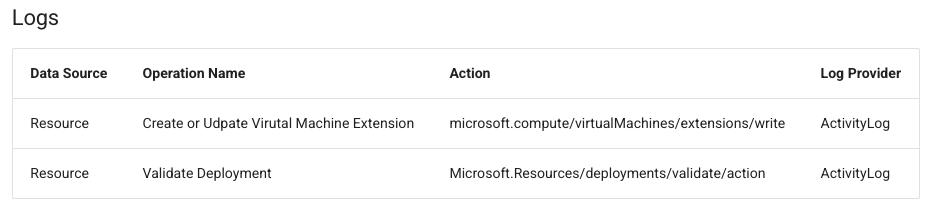
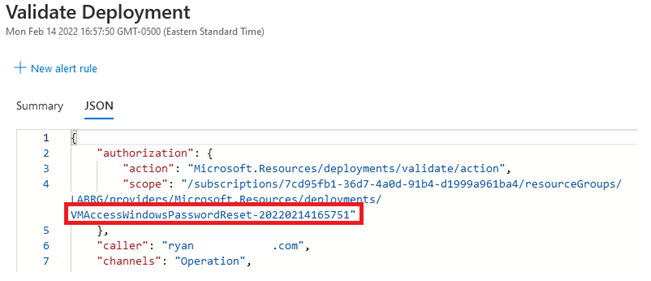
However, during testing of this activity, the Microsoft.Resources/deployments/validate/action event never occurred, meaning that the Microsoft-provided guidance on detection was not effective here.
Recommendations
The extension resource name in the resourceId path is also an unreliable detection signal. Instead, consider the following alternatives:
- Match on the operation name.
Microsoft.Compute/virtualMachines/extensions/writecaptures all extension deployments regardless of naming. While effective, this will be noisy as engineers do these things often, creating false positives. - Correlate with Azure Resource Graph or the Extensions API. Querying
Microsoft.Compute/virtualMachines/extensionsreturns the actual publisher and type for any installed extension. - Alert on any extension write to sensitive VMs. For production or high-value VMs, any extension deployment warrants investigation, regardless of the resource name.
Conclusion
Naming inconsistency across Microsoft's Portal, CLI, and documentation teams ultimately culminated in a deeper challenge: The extension resource name is an unvalidated, caller-controlled string with no semantic meaning. The detection guidance provided by MSFT is ineffective. This inconsistency became visible only when detection rules needed to match on telemetry from multiple tool surfaces, and those rules turned out to be trivially evadable. Modern multicloud organizations are complex and additional issues related to legacy interconnections with the cloud will continue to occur.
Disclosure timeline
This finding was reported to the Microsoft Security Response Center (MSRC) on April 7, 2026. On May 11, 2026 Microsoft concluded that “Upon investigation, we have determined that this is not considered a security vulnerability because resource names are always user specified.”
Appendix: Known Azure VM extension names for threat hunters
The extension resource name — the {name} segment in /virtualMachines/{vm}/extensions/{name} — is what appears in activity logs. Azure does not validate or constrain it. The names below are what Microsoft's own tools use by default. Any extension resource name not in this list is an outlier worth investigating.
References:
- Azure VM Extensions Overview
- VM Extensions for Linux
- VM Extensions for Windows
- Azure CLI source — custom.py (current)
- Azure CLI PR #482 — enablevmaccess constant introduced (July 2016)
- Azure CLI PR #2395 — Adaptive name reuse added (March 2017)
- Azure CLI Issue #11626 — VMAccessAgent version mismatch
- Microsoft Learn — VMAccess for Linux
- Microsoft Learn — VMAccess for Windows
- MicrosoftDocs/azure-compute-docs — vmaccess-linux.md history
- MITRE ATT&CK T1036 — Masquerading
- MITRE ATT&CK T1098 — Account Manipulation