


Get security briefings from the Threat Research Team
New campaigns, attacker techniques, and detection guidance — straight to your inbox.

Falco Feeds extends the power of Falco by giving open source-focused companies access to expert-written rules that are continuously updated as new threats are discovered.
Connect your AI agents to Sysdig Monitor
It's 3 a.m., and an application pod is crashlooping. Your engineer already has Claude, ChatGPT, Gemini, or Copilot open, but those tools can’t get to the root cause. At least, that used to be the case. Now, you can seamlessly integrate the answers that live in Sysdig Monitor into your coding agent of choice. No tab switching, dashboard hunting, or pasting metrics into a chat. Just plain-language prompts for faster troubleshooting with less friction and complexity.
The new Sysdig Monitor model context protocol (MCP) server connects the AI assistant your team already uses to live container, Kubernetes, and cloud monitoring data. Engineers can ask in plain language and get an answer grounded in what is actually running in their clusters, without leaving the tool they work in. It works with Claude, ChatGPT, Gemini, and Copilot, and any client that supports remote MCP, like Claude Code.
Setup takes under a minute and needs no approval ticket. There is no API token to copy, rotate, or leak, no config file, and nothing to install. Security teams get what they ask for first. Every AI assistant sees exactly what that user can see in the Sysdig Monitor UI, because the same team permissions apply. Each connected AI assistant also gets its own access, which you can revoke on its own. Most MCP servers still ask for a static API key; Sysdig signs you in the same way a modern SaaS app does.
Behind the connector are more than 30 tools built for Kubernetes troubleshooting: workload and node metrics, live pod manifests, live logs, image rollouts, storage, resource quotas, and PromQL. Every metric arrives already labeled with its cluster, namespace, and workload, so the AI assistant reasons over real Kubernetes context instead of raw numbers.
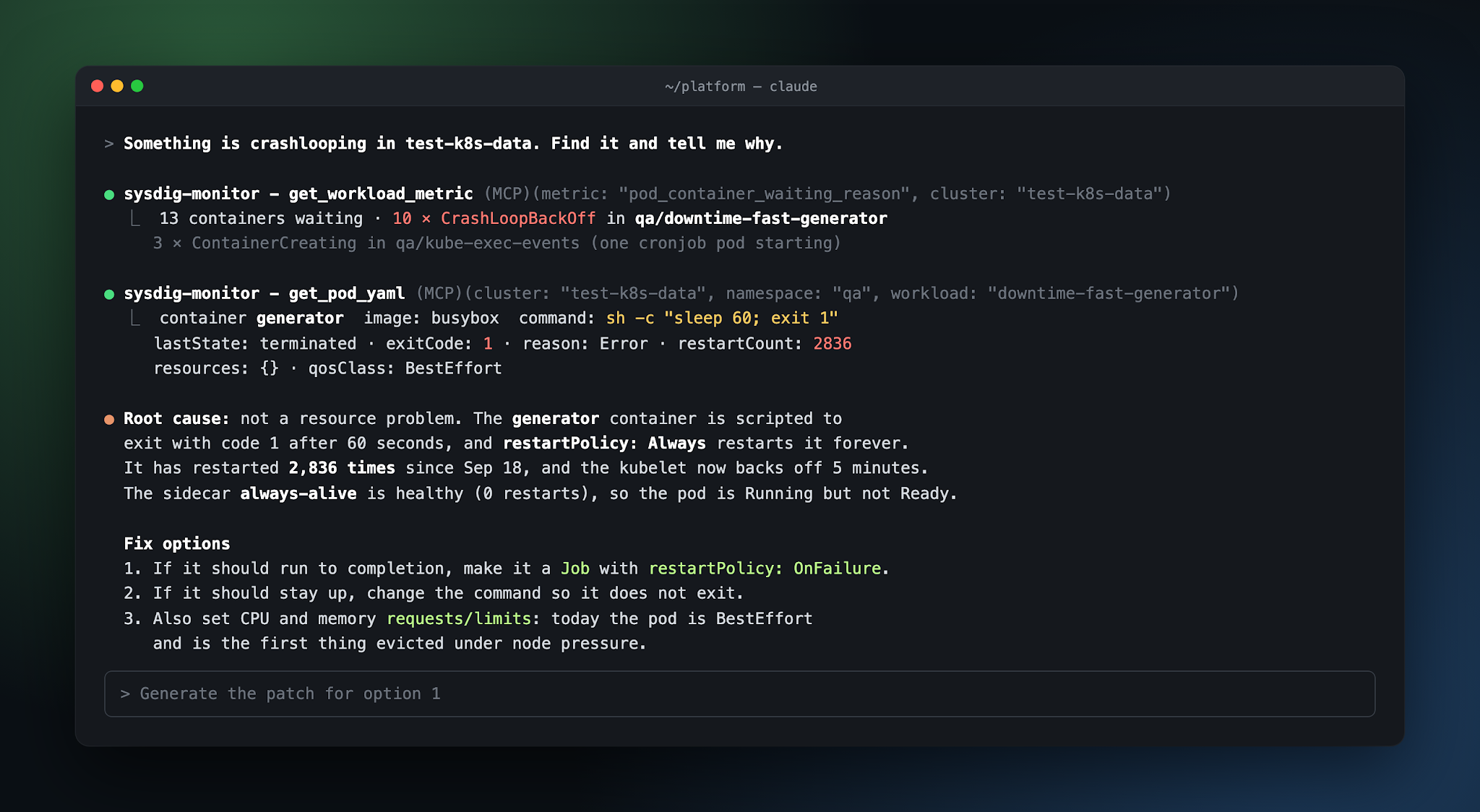
As an example, you could tell Claude Code "something is crashlooping in this cluster, find it and tell me why.” Working with Sysdig Monitor, the agent finds the containers in CrashLoopBackOff, reads the pod spec, and explains the problem: a container that exits with code 1 every 60 seconds and has restarted 2,836 times. Then it gives you the fix.
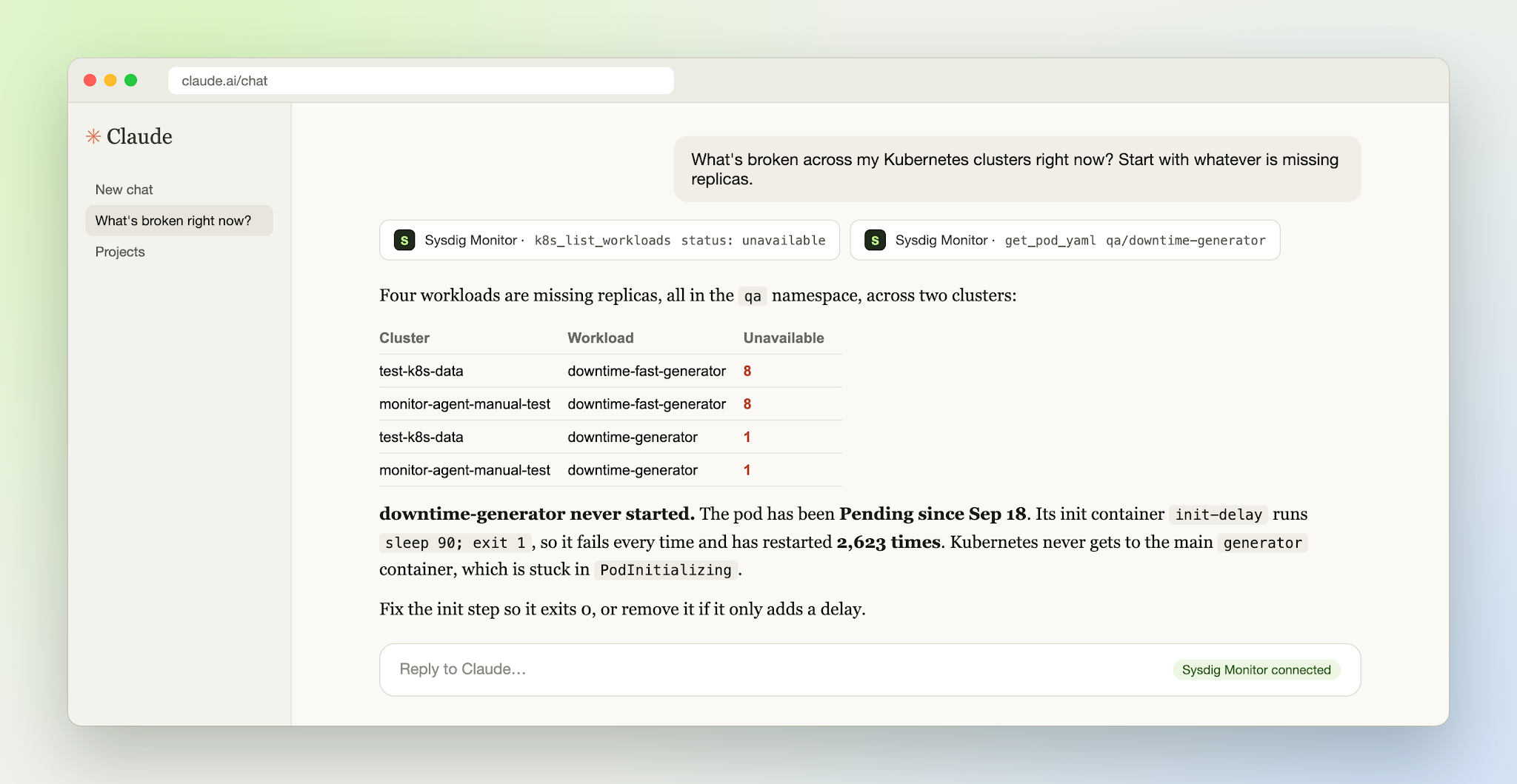
You could also ask Claude "what's broken across my clusters right now?" You would get every workload missing replicas across two clusters, plus the reason one of them never started. Minutes of clicking becomes one question, asked in plain language and quickly answered.
With Sysdig you don't have to choose between our AI and yours. Sysdig’s GenAI assistant in the Sysdig Monitor UI can still provide troubleshooting guidance. Or you can use the hosted MCP server to bring the same live data to every other place your engineers work, be it the IDE, the terminal, or the chat window they keep open all day.
For platform teams, the Sysdig MCP server means faster answers on call without everyone learning PromQL. For engineering leaders, it means the AI tools you already pay for get more useful on day one.
Use cases for the Sysdig MCP server for monitoring
The Sysdig MCP server is now generally available and offers several Kubernetes troubleshooting use cases, including:
- Inventory and inspection for Kubernetes clusters, namespaces, pods, and workloads.
- Lightning-fast root case analysis across workloads and nodes, using metrics, live logs, pod manifests, and storage and quota status.
- Discovery and correlation of metrics and labels, PromQL queries, and chart metrics over time.
- Streamlined Sysdig administration to view and manage users, teams, and roles.
Additional use cases are described in the Sysdig MCP server documentation.
To try the Sysdig MCP server, add https://<region>.sysdigcloud.com/mcp/monitor to your assistant, sign in, and ask your first question. If you'd like a guided demo for your team, contact your Sysdig account team.
To connect the Sysdig MCP server to your coding agent of choice, follow the steps listed in our documentation.