Shadow AI in 2026: A Field Guide to the AI You Can't See
Shadow AI is any artificial intelligence an organization uses or runs without security visibility or governance.
It spans the tools employees adopt, the models developers build, and the agents that act on their own. Some activities are difficult to observe. Especially embedded AI features, local models, API-based integrations, and autonomous workloads.
%201.svg)


- Shadow AI has outgrown its old reputation. It's no longer just employees pasting secrets into chatbots. It spans three layers: the tools people use, the models teams build, and the agents that act on their own. Each is harder to see than the last.
- The core problem isn't approval. It's visibility. Most security tools were built to watch apps and files, and shadow AI is often neither.
- Banning it doesn't work. People keep using AI that helps them, just out of sight. The better approach is a safe path they'll actually choose, plus layered detection of what's already running.

What's the difference between shadow AI and shadow IT?
The difference between shadow AI and shadow IT is what you're looking for.
Shadow IT is the broader category. It covers any technology used outside approved processes. A SaaS account. A cloud service. An API someone wired up without telling anyone. It's unsanctioned, but it's still a thing you can point to and inventory, scan, and block.
Shadow AI overlaps with that, but the AI slice is harder to find. It can be a standalone service, which behaves like classic shadow IT. It can also be a feature inside a tool you already approved, a prompt typed into a browser, a model called through an API from inside your own code, or an agent acting on its own. There's not always something to install or scan.
That's why discovery takes more than an application inventory. You need network, identity, data, code, and runtime signals together.
Here’s a breakdown of how the two compare:
So the shift is simple. Shadow IT was a thing you could locate. Shadow AI is a behavior you have to observe.
Why do employees and teams use shadow AI?
People use shadow AI because it works. The tools are fast. They're easy. And a worker can finish a task before security ever knows the tool is in use.
That's the part worth understanding first. Shadow AI is rarely an act of rebellion. It's usually an act of productivity.
Here's why.
As we all know, AI tools can help a person finish more work in less time.
The measured gains in speed and output are real. When a tool makes someone faster, they tend to keep using it. Even without approval. In fact, 66% of office professionals have used AI tools at work even though they believed it wasn't allowed under company policy, according to PagerDuty’s Shadow AI Survey.
It isn't only individuals, though.
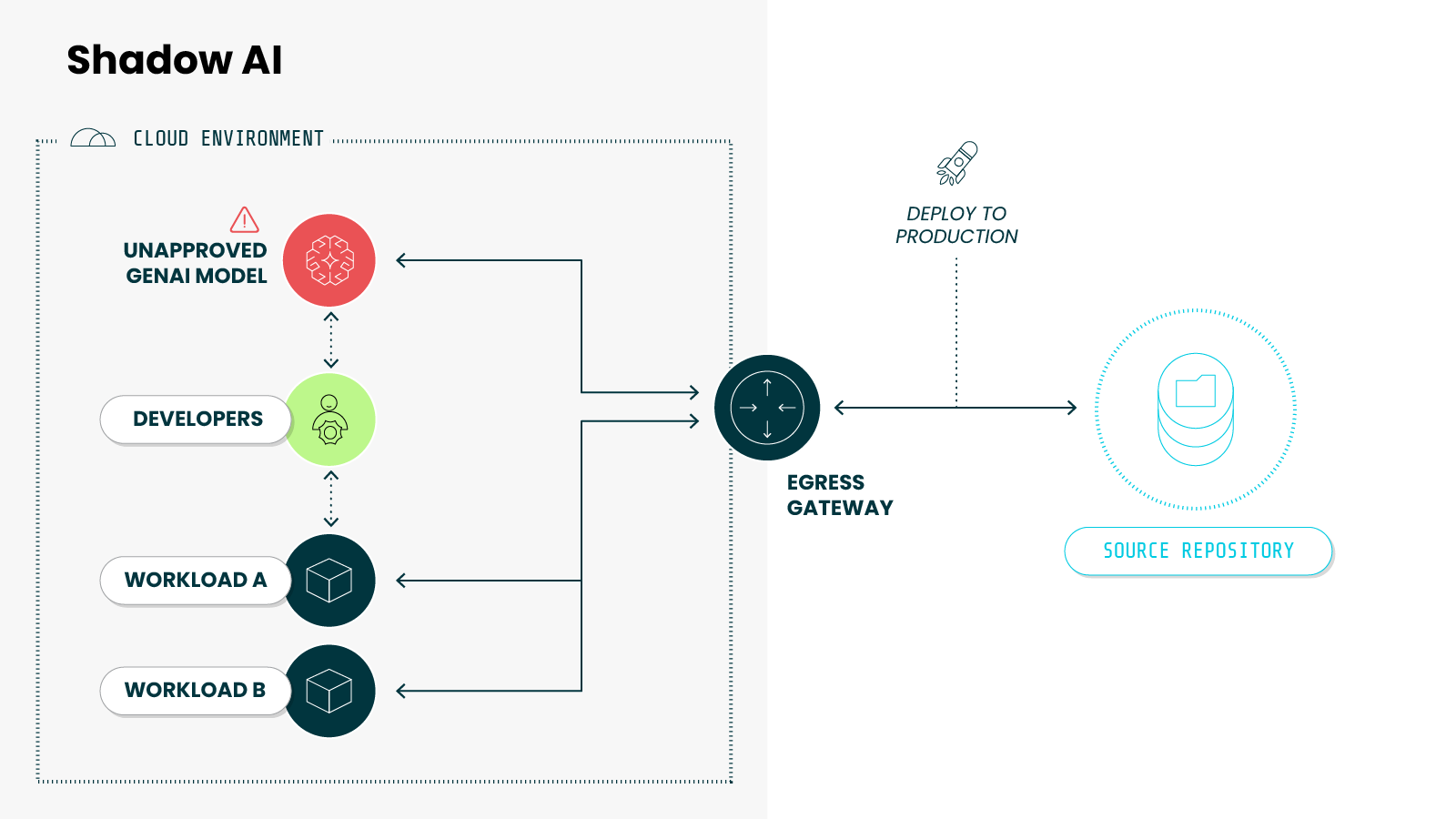
Whole teams do the same thing. A developer wires an AI model into an application through an API. A platform team stands one up to speed delivery. The reason is the same as before. It helps them ship faster. But in these cases, the shadow AI isn't a browser tab. It's part of the codebase.
Plus, the rules haven't caught up.
90% of IT and security professionals believe employees are using AI, yet only 38% of organizations have a formal, comprehensive AI policy as reported in ISACA’s, 2026 AI Pulse Poll. The use runs ahead of the rules, out of view of the teams responsible for securing it.
That's what makes shadow AI durable as an AI security threat. The pull is productivity, and productivity doesn't switch off. You can block a tool, but not the reason people reach for it.
Which means the real question isn't only how to stop shadow AI. It's how to see it, and how to channel it safely.
That's a governance problem we'll return to at the end.
Breaking down the three layers of shadow AI
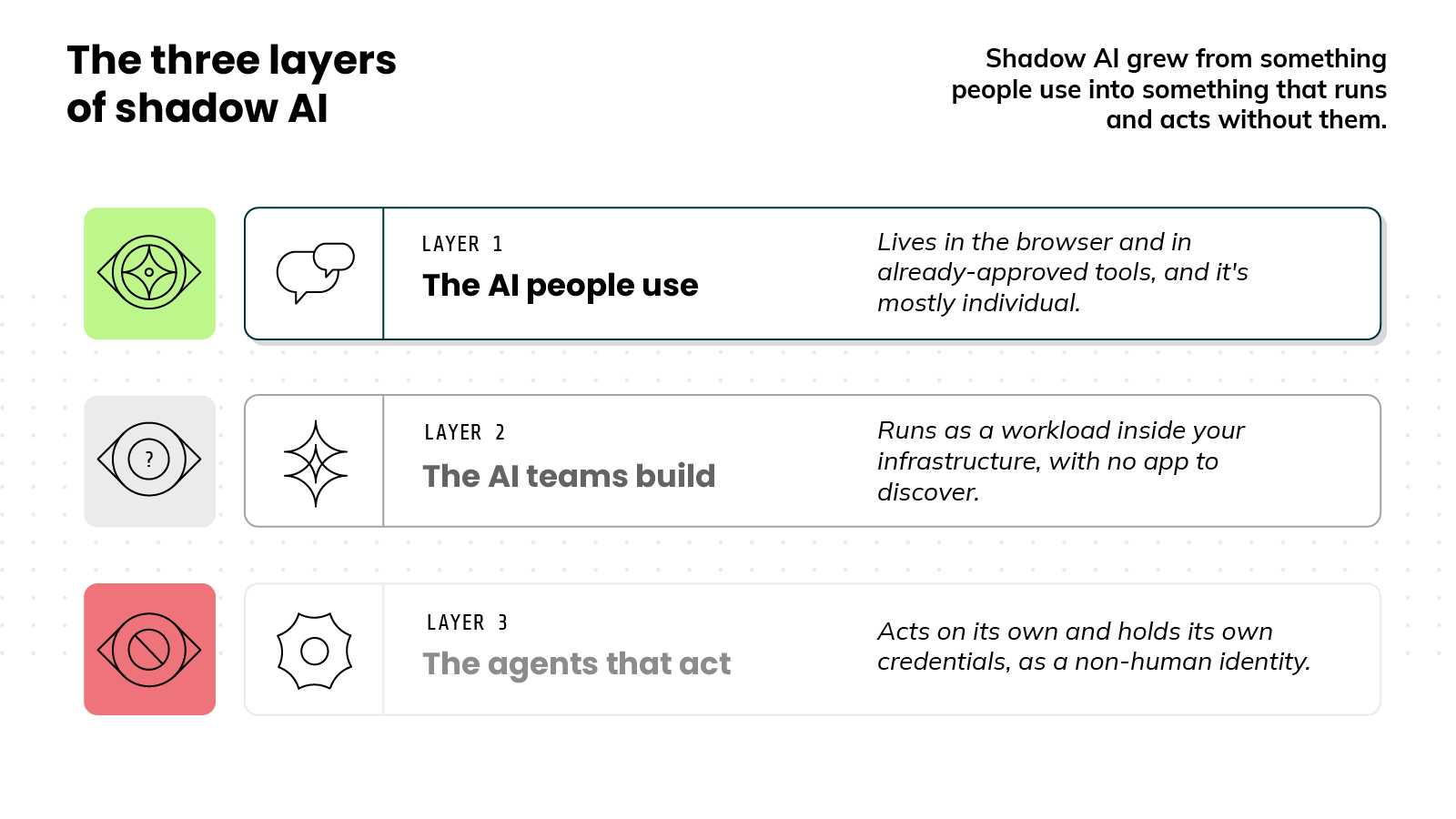
Shadow AI shows up in three layers:
- The AI employees use.
- The AI teams build.
- And the agents that now act on their own.
These layers didn't appear all at once. They arrived one wave at a time, and each is harder to see than the last.
Layer 1: The AI people use
This is the layer most people picture.
An employee pastes text into a public chatbot. Maybe it's an AI feature riding along in a browser extension. Or just a personal account, used quietly to get the work done.
There's also a quieter version.
AI is now built into tools already approved. For example, a vendor ships a generative feature in its next release and switches it on by default. No one on the security team chose to adopt it, and nothing about the app's status changed. The AI just arrives in software you already trust.
Layer 2: The AI teams build
Here shadow AI moves out of the browser and into your own infrastructure.
At this layer, AI becomes part of how software gets built. It might be a model called through an API from inside an application, one running on the company's own hardware, or a vector database stood up to hold embeddings. These aren't tools someone opened in a tab. They're components wired into the systems the business runs on.
And that's exactly what makes the AI teams build hard to find. There's no SaaS app to discover, no login page to flag, and no vendor to assess. Instead, the model runs as a workload, buried in infrastructure like any other process. It's no surprise that many organizations can't say which AI services are running in their environment at all.
Layer 3: The agents that act
Earlier layers respond to a person. Now we're dealing with AI agents that act.
An agent can read files, call APIs, query databases, and trigger other agents. All without a person prompting each step.
An agent needs credentials to do its job, so it holds its own keys and permissions. These are non-human identities. And they already outnumber human users by a wide margin.
The problem is that most access controls were built for people. They weren't built for software that holds permissions and acts on its own.
Ultimately, shadow AI grew from something people use into something that runs and acts without them. Which raises the obvious question. If it's this hard to see, how do you detect it?
Why is shadow AI so hard to detect?
Shadow AI is so hard to detect because most security tools were built to watch applications and files. Shadow AI is usually neither.
That's the heart of the problem.
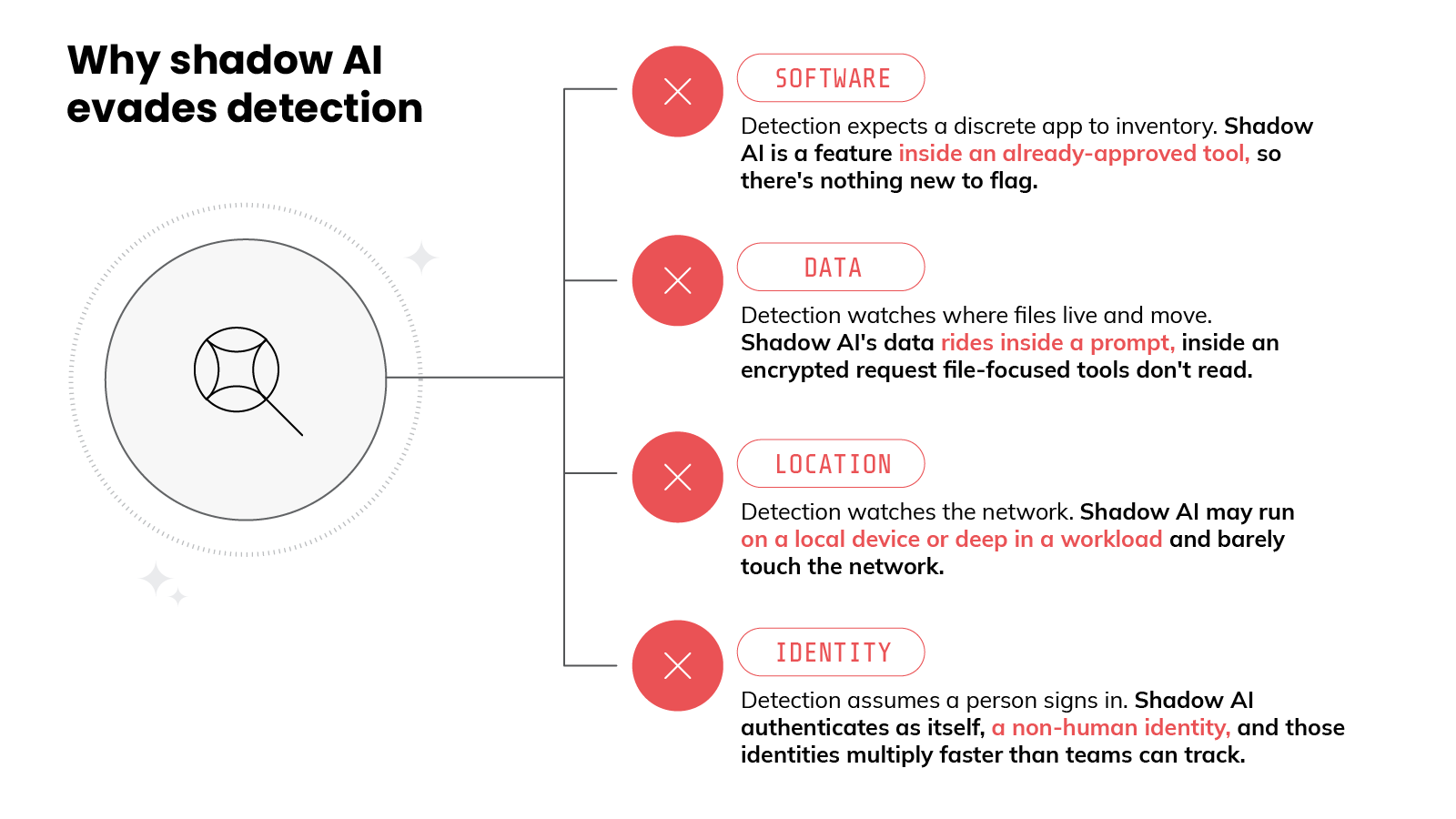
Most detection assumes there's a discrete artifact to find, an app to inventory or a file to inspect, and shadow AI rarely leaves one behind. Several factors push it out of view at once.
The first is that AI is rarely a standalone app anymore.
It shows up as a feature inside tools you already approved, so there's no new software to flag and the use blends into traffic you cleared long ago.
The second is the data itself.
Older tools watched where files lived and moved, but shadow AI sends its data inside a prompt. And that prompt rides inside an encrypted request that file-focused tools simply don't read.
FYI: DLP scans for patterns like a credit card or SSN format. A prompt slips past by paraphrase. "Summarize our Q3 numbers for the Acme deal" leaks the same secret with no pattern to match. DLP isn't misconfigured here. It's structurally blind to natural language.
The third is location.
Some AI runs on a person's own device, and some runs deep inside a workload, so it doesn't always cross the network in a way monitoring can see. A model running locally may produce almost no network signal at all.
Then there's identity.
Which is where the newer shadow AI gets genuinely difficult. Much of it has no humans behind it. An agent acts on its own and authenticates as itself, and most access controls were built on the assumption that a person is signing in. They struggle with software that carries its own access.
Worse, AI identities are multiplying faster than most teams can track them, so the list keeps growing faster than anything monitoring it.
FYI: Human identities have a lifecycle. Someone's hired, they leave, their access gets revoked. Most non-human identities have no such process, so an agent's credentials often outlive the project that created them. Nothing triggers their removal.
Put it together and the gap is clear. The software isn't discrete, the data hides in a prompt, the model may never touch the network, and the user may not even be a person. Inventory and scanning still help, but they were built for installed apps and stored files. Not for AI that only exists while it runs.
That's the takeaway. The clearest signal of what shadow AI is doing comes from watching it operate, not from a list of what was once installed.
How does shadow AI actually get exploited?
Most coverage of shadow AI stops at one risk: someone leaks sensitive data into a chatbot. That happens, and it matters. But it's the smallest version of the problem.
Once you account for the AI teams build and the agents that act, the threat gets wider and more serious.
It helps to walk it by layer, because each one is exploited differently.
Start with the AI people use. The classic case is data leaving in a prompt.
An employee pastes source code or customer records into a public tool, and that information is now outside the organization's control. Some services may even retain it or use it to train future models.
The embedded AI inside approved tools carries the same risk, just more quietly, because no one chose to turn it on.
The layer teams build introduces a different problem: the supply chain.
A model pulled from a public registry isn't guaranteed to be clean. It can be poisoned or backdoored before it ever reaches your environment.
And the infrastructure around it can be exposed in ordinary ways. In early 2025, the AI startup DeepSeek left a database open to the internet with no authentication. More than a million log entries spilled out, including chat history, API keys, and backend details.
The agent layer is where it gets most dangerous, because agents can act.
An attacker doesn't always need to break in. Sometimes they just need to leave a message the agent will read. That's prompt injection.
A hidden instruction inside an email, a document, or a web page can redirect what the agent does next. In documented cases, this has been enough to pull sensitive data out of a connected system, or to trick an AI coding assistant into running commands on its own.
That last point is the real shift. An agent holds credentials and permissions. So a hijacked agent isn't just a leak. It's a foothold. It can move through systems the way an intruder would, except it was already inside and already trusted.
Identity makes this worse. Many of these agents are over-permissioned, and plenty are forgotten.
An agent created months ago may sit unused while its access stays live. That's a standing door into the environment that no one is watching.
So the danger was never only about leaked data.
It's poisoned models, hijacked agents, and trusted identities that hold real permissions with no supervision. And the reason these go undetected for so long is the same reason from the last section. No one can see them while they run.
→ Continue learning:
- What Is a Supply Chain Attack? [Overview, Types & Examples]
- The Comprehensive Guide to Prompt Injection Attacks in 2026
What does shadow AI cost organizations?
"Among the organizations studied this year, 20% said they suffered a breach due to security incidents involving shadow AI. For organizations with high levels of shadow AI, those breaches added USD 670,000 to the average breach price tag compared to those that had low levels of shadow AI or none."
—IBM, Cost of a Data Breach Report 2025: The AI Oversight Gap
IBM's Cost of a Data Breach Report 2025 breaks down breach data spanning hundreds of organizations, and it's the clearest dollar estimate of what unmonitored AI use actually costs.
The reason isn't mysterious. When AI use is invisible, breaches involving it are harder to catch and slower to contain. And a longer breach is a more expensive one.
The surrounding numbers tell the same story.
Among organizations breached through an AI tool, the overwhelming majority lacked proper access controls for it. Most had no AI governance policy in place, or were still writing one. The gap wasn't bad luck. It was missing oversight.
Not to mention, there's a second cost that doesn't show up on the breach invoice.
Shadow AI breaches tend to expose more than the average breach. They more often involve personal data and intellectual property. That widens the damage into regulatory penalties and lost trade secrets.
Those aren't hypothetical. Regulators have already issued multimillion-dollar fines over how AI tools handle personal data. And in at least one case, an employee's use of an unsanctioned AI tool put a company's trade-secret protections at risk in court. The legal bill can arrive long after the breach does.
And the problem keeps climbing.
"Risks like shadow AI, technical debt, skills erosion, data sovereignty demands, interoperability issues and vendor lock-in represent hidden undercurrents that can undermine long-term success. Gartner predicts that by 2030 these blind spots will create the dividing line between enterprises that scale AI safely and strategically and those that become locked in, outpaced or disrupted from within."
—Gartner, "Gartner Identifies Critical GenAI Blind Spots That CIOs Must Urgently Address," November 19, 2025
These gaps don't resolve on their own. Left unseen, they compound. And decide who scales AI safely and who gets left behind.
So the price of shadow AI isn't only the breach itself. It's the premium you pay for not seeing it coming.
How do you detect shadow AI?
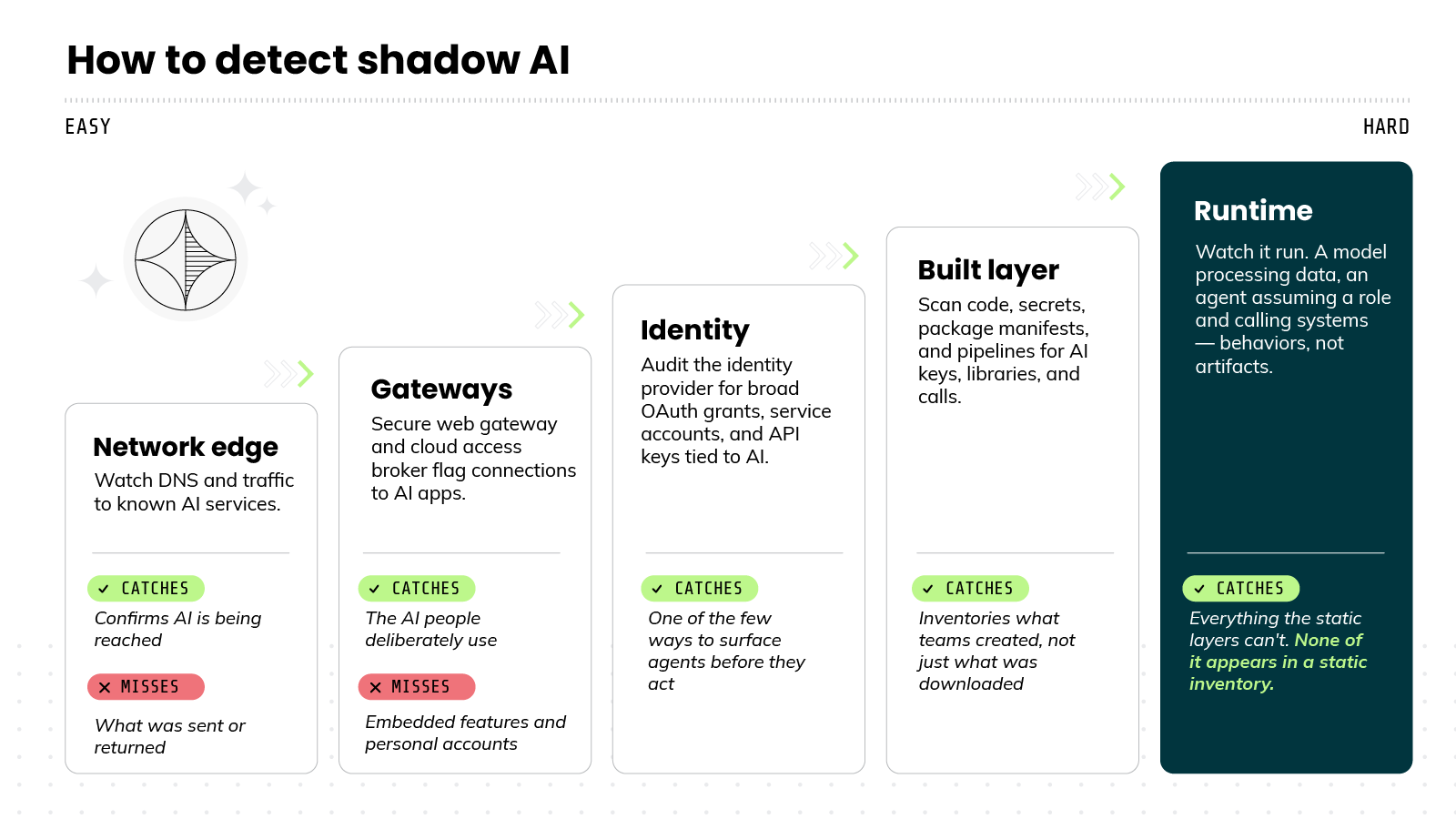
You detect shadow AI by combining signals from across your environment: network traffic and DNS, your identity provider, code and build pipelines, and what's running at runtime. No single source sees every layer, so the layers work together.
Each layer shows up in a different place, which is why the detection approach has to span all of them. The hardest to see — the AI teams build and the agents that act — surface at runtime, because that's where they actually run.
Let's walk through each layer from the easiest to detect to the hardest.
Start at the network edge.
You can watch DNS queries and traffic headed to known AI services. This tells you something useful: that AI is being reached. It won't tell you what was sent or what came back. But it's a fast way to confirm the use exists.
Use the gateways you may already run.
A secure web gateway or a cloud access broker can flag connections to sanctioned and unsanctioned AI apps. These work well for the first layer, the AI people use. They're weaker on the quieter cases, like embedded features inside approved tools or activity from personal accounts.
Audit identity next.
A large share of shadow AI hides in over-scoped permissions and forgotten access. So it pays to review your identity provider. Look for AI apps granted broad OAuth permissions. Also look for service accounts and API keys tied to AI services.
This is one of the few ways to surface agents before they act.
Pro tip: Sort OAuth grants by scope, not by how many people use the app. A niche AI tool with read/write mailbox access beats a popular one with read-only. High-scope, low-usage grants are where forgotten integrations hide.
Dig into the built layer.
This is the AI your own teams stood up, so the signals live in your environment, not at the perimeter. You can scan code and secrets stores for API keys to model providers. You can check package manifests for AI libraries. You can review build pipelines for steps that call out to AI services.
The point is to inventory what was created, not just what was downloaded.
Pro tip: Before scanning every repo, check egress logs for outbound calls to model-provider endpoints. Code scanning shows what might call a model; egress shows what actually did — including AI wired in through env vars that never appears in source.
Then watch it run.
Inventory has a ceiling. It captures what exists at a moment in time, not how anything behaves. And the most serious parts of shadow AI are behaviors, not artifacts. A model processing data. An agent assuming a role and calling other systems.
These happen at runtime, so runtime is where you see them. A model running in a container becomes visible. An agent authenticating and reaching for resources becomes visible. None of it appears in a static inventory, because none of it's sitting still.
So the practical approach is to combine the layers, not pick one.
Network and identity signals are fast, so start there. Code and pipeline inventory covers the built layer. Runtime anchors the rest, because it's the layer where the model and the agent can actually be observed in action.
Pro tip: Don't alert on the first AI process you see. You'll drown in sanctioned-tool noise. Baseline normal AI activity, then flag deviations: a model hitting a new endpoint, an agent touching data it never touched before.
One habit ties it together: treat detection as ongoing.
Shadow AI isn't a one-time sweep. New tools, agents, and integrations appear constantly. The goal isn't a clean audit on a Tuesday. It's continuous visibility into what's running.
→ Continue learning:
How do you govern shadow AI without banning it?
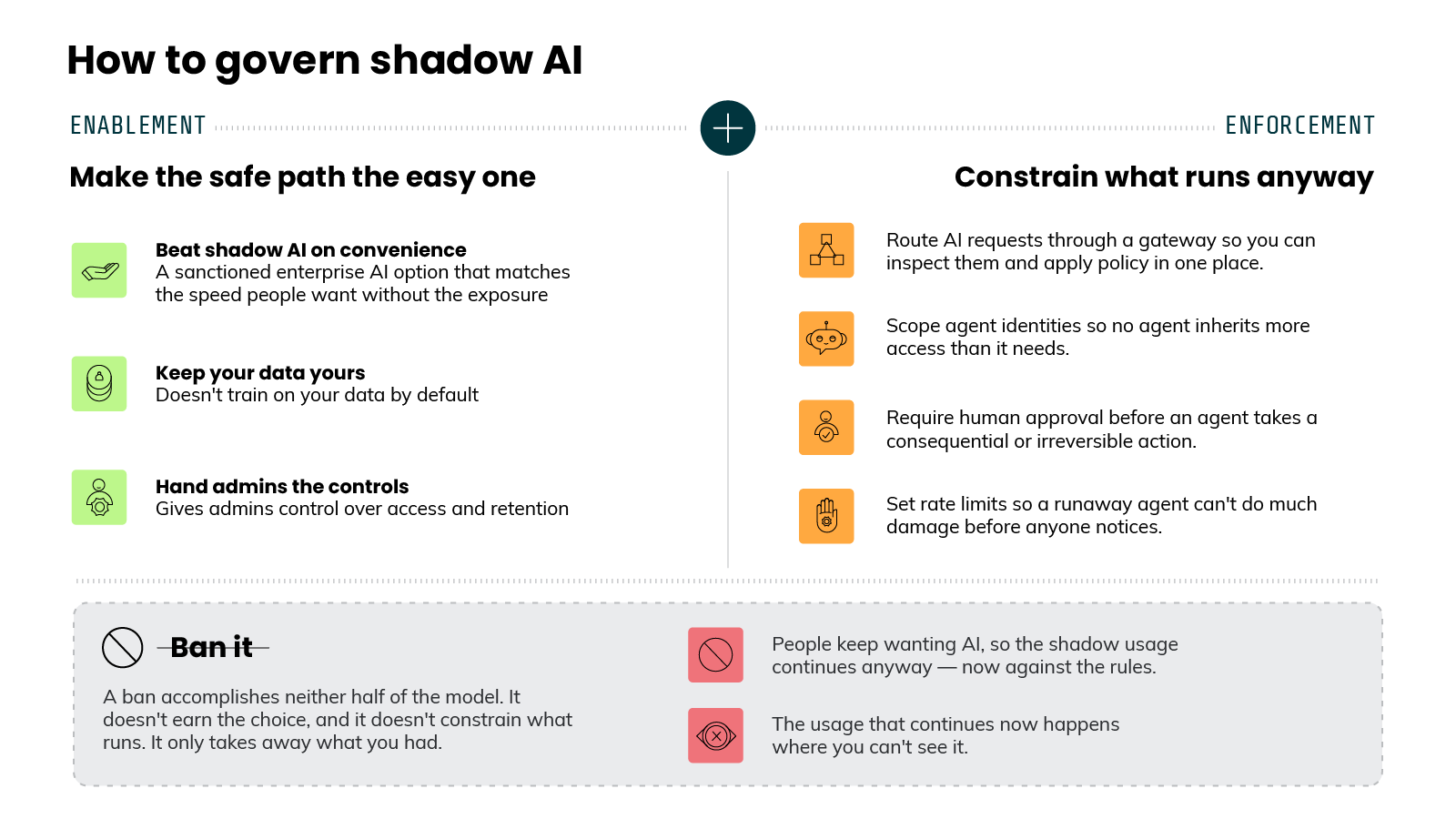
You govern shadow AI by making the sanctioned path the easy one, then enforcing guardrails where AI actually runs. Banning it is generally ineffective because it only removes your visibility into the use that continues anyway. Basically, enablement plus enforcement, not permission versus prohibition.
Good governance makes the safe option the easy option. Then it enforces guardrails where AI actually runs. Banning AI does neither, which is why bans tend to fail.
People reach for shadow AI because it helps, and plenty of employees will keep using personal tools even if those were banned outright. A ban doesn't remove that motivation. It just removes your visibility into it. So the goal isn't to stop AI use. It's to give people a sanctioned path that's good enough to choose on its own.
That path starts with a real alternative. Enterprise AI tools can offer the same speed without the same exposure. The better ones don't train on your data by default, and they give administrators control over access and retention. When the approved option is genuinely useful, far fewer people go looking elsewhere.
But a good alternative isn't enough by itself, because some shadow AI will always slip through. That's where guardrails come in. The most effective ones sit close to where AI runs, not in a policy document.
A few guardrails for limiting what unsanctioned AI can do:
- An AI gateway gives you a single point to route requests through, inspect them, and apply policy.
- Scoped identities keep agents from inheriting more access than they need. So a single compromised agent can't reach everything.
- Human approval on consequential actions keeps an autonomous agent from taking an irreversible step unsupervised.
- Rate limits cap the damage a runaway agent can do before anyone notices.
Notice what these have in common. They don't try to predict misuse in advance. They constrain what AI can do while it's doing it. That's the shift from writing rules to enforcing them at runtime.
Policy still has a place.
Frameworks and standards give you the inventory, accountability, and documentation that audits and regulators expect. A clear acceptable-use policy tells people what's allowed. These matter.
But they describe intended behavior. They don't enforce actual behavior. The two layers work together: policy sets the expectation, runtime controls hold the line.
So governing shadow AI isn't a choice between permission and prohibition. It's enablement plus enforcement. Give people a safe path they'll actually take. Then watch and constrain what runs, so the AI you didn't sanction can't do harm unseen.
Shadow AI FAQs
Blog: Security briefing: AI issues are stealing the spotlight